So, how does dispatcher decide which process to run next?
-
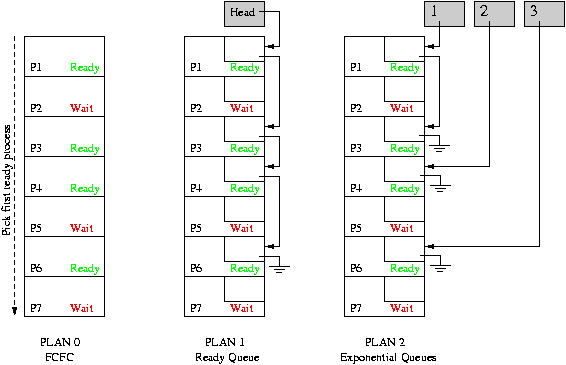
Plan 0: search process table from front, run first runnable process.
- Might spend a lot of time searching.
- Weird priorities.
- Plan 1: link together the runnable processes into a queue. Dispatcher grabs first process from the queue. When processes become runnable, insert at back of queue.
- Plan 2: give each process a priority, organize the queue according to priority. Or, perhaps have multiple queues, one for each priority class.
CPU can only be doing one thing at a time: if user process is executing, dispatcher is not: OS has lost control. How does OS regain control of processor?
Internal events (things occurring within user process):
- System call.
- Error (illegal instruction, addressing violation, etc.).
- Page fault.
These are also called traps. They all cause a state switch into the OS.
External events (things occurring outside the control of the user process):
- Character typed at terminal.
- Completion of disk operation (controller is ready for more work).
- Timer: to make sure OS eventually gets control.
External events are usually called interrupts. They all cause a state switch into the OS. This means that user processes cannot directly take I/O interrupts.
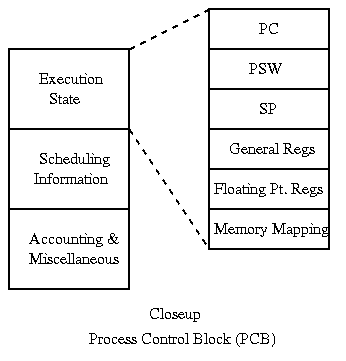
When process is not running, its state must be saved in its process control block. What gets saved? Everything that next process could trash:
- Program counter.
- Processor status word (condition codes, etc.).
- General purpose registers.
- Floating-point registers.
- All of memory?
How do we switch contexts between the user and OS? Must be careful not to mess up process state while saving and restoring it.
Saving state: it is tricky because the the OS needs some state to execute the state saving and restoring code.
- Hand-code in assembler: avoid using registers that contain user values.
- Still have problems with things like PC and PS: cannot do either one without the other.
-
All machines provide some special hardware support for
saving and restoring state:
- Most modern processors: hardware does not know much about processes, it just moves PC and PS to/from the stack. OS then transfers to/from PCB, and handles rest of state itself. (We will see processor knowledge about processes when we discuss virtual memory.)
- Exotic processors, like the Intel 432: hardware did all state saving and restoring into process control block, and even dispatching.
Short cuts: as process state becomes larger and larger, saving and restoring becomes more and more expensive. Cannot afford to do full save/restore for every little interrupt.
- Sometimes different amounts are saved at different times. E.g. to handle interrupts, might save only a few registers, but to swap processes, must save everything. This is a performance optimization that can cause BIZARRE problems.
- Sometimes state can be saved and restored incrementally, e.g. in virtual memory environments.
Creating a process from scratch (e.g., the Windows CreateProcess):
- Load code and data into memory.
- Create (empty) call stack.
- Create and initialize process control block.
- Make process known to dispatcher.
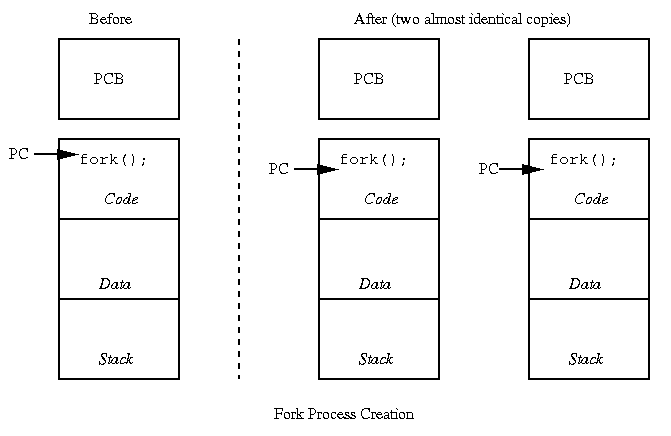
Forking: want to make a copy of existing process (e.g., Unix/Linux).
- Make sure process to be copied is not running and has all state saved.
- Make a copy of code, data, stack.
- Copy PCB of source into new process.
- Make process known to dispatcher.
What is missing?
For an interesting perspective on fork, check out this recent paper. Note that I don't agree with many of their arguments:
Andrew Baumann, Jonathan Appavoo, Orran Krieger and Timothy Roscoe, A fork() in the Road, 18th Workshop on Hot Topics in Operating Systems (HotOS'19), Bertinoro, Italy, May 2019. https://doi.org/10.1145/3317550.3321435.
Copyright © 2018, 2020 Barton P. Miller
Non-University of Wisconsin students and teachers are welcome to print these notes their personal use. Further reproduction requires permission of the author.