Getting Started
Open a new script in MATLAB: If you are in the tab, select ; if you are in the tab, select or type
Add the following header comment (with the appropriate information filled in) at the top of your script:
%% Team Lab 7: Data Fitting
Start your script with a clear command (below the header comment).
Problem 1: Simple polynomial fit and interpolation
Computer-controlled machines are used to cut and to form metal and other materials when manufacturing products. These machines often use interpolating functions (such as splines) to specify the path to be cut or the contour of the part to be shaped. The data in this table represents the shape of a car's front fender (units are in feet).
| x data | 0 | 0.25 | 0.75 | 1.25 |
1.5 | 1.75 | 1.875 | 2 |
2.125 |
2.25 |
|---|---|---|---|---|---|---|---|---|---|---|
| y data | 1.2 |
1.18 |
1.1 |
1 |
0.92 |
0.8 |
0.7 |
0.55 |
0.35 |
0 |
First add commands to create xdata and ydata to contain ALL data points.
Next, add commands to the m-file to interpolate the data using:
(i.e., what this is asking you to do is to find the coefficients of the interpolating polynomial in each case)
You should not retype any data; instead use only the parts of the xdata and ydata vectors that you need for each analysis.
Add commands to plot the three polynomials and the data points on the same graph from x = 0 to x = 2.25. Use the hold on and hold off commands in MATLAB. Since this data represents a physical object, use the axis equal command to make MATLAB use the same "ruler" (scale) for both the x- and y-axis. Also, use the axis command to scale the plot so that x ranges from 0 to 2.25 and y ranges from 0 to 1.5.
Discuss the following with your team:
Now let's see how a cubic spline interpolates the data:
Finally, you will use your interpolations to estimate the y values for some specific x values:
SHOW YOUR PLOTS from 1.b and 1.d and answers to the questions in 1.c and 1.e to a Lab Leader
Problem 2: Simple exponential fit
Fitting exponential data requires using the linear least squares method. You will use MATLAB to fit the data and plot both the data and the function that approximates the data. First, let's try a simple exponential fit of the data in Table 1.
Table 1
| x data | 0 | 1 | 2 | 3 | 4 | 5 | 6 | 7 | 8 | 9 | 10 |
| y data | 12011 | 5311 | 2696 | 1595 | 1086 | 805 | 627 | 499 | 409 | 332 | 271 |
Note that an exponential function
can be written as an equation of a straight line by taking the natural logarithm on each side of the equation to obtain
Write a script to fit the data in Table 1 with an exponential function.
Hints:
What are the values of a and b? Add code to your script to calculate these values.
Plot a graph of the (x, y) data points against the approximating function.
Estimate the value of y for x = 5.500.
What changes (if any) would you have to make to approximate an exponential growth?
What would happen if your approximation used only the first four data points? Plot the resulting function against x = [0 : 0.01 : 10], noting any discrepancies between this approximation and the data points.
Concluding remarks for problem 2 (i.e., why you should do problem 3):
Using a single exponential function to fit the data does not provide a very good approximation. The reason why is that the y data values come from a situation in which the underlying physical process is described using the sum of two exponential functions (one which dominates for small values of x and one which dominates for large values of x). Problem 3 of this lab describes the situation that gave rise to the data in Table 1 in more detail and shows you how to extract approximations for both exponential functions.
SHOW THAT YOUR FUNCTION KIND OF FITS THE DATA SET to a Lab Leader before you continue with Problem 3 to find a function (a curve) that is a better fit.
Problem 3: Determination of two radioactive decay rates
You are given a sample of material with two unknown substances in it. To determine what they are, you choose to use neutron activation analysis. You irradiate the sample in the nuclear reactor to activate both of the unknown substances. You then count their radioactive decay using a radiation detector. You know that each of the materials has a characteristic radioactive decay constant and that each material decays in time according to an exponential function. Thus the radiation detector counts the sum of the decays of the two unknown materials according to:
Where A1 + A2 is the initial count rate (counts / second) at t = 0, and λ1 and λ2 are the decay constants for material 1 and material 2.
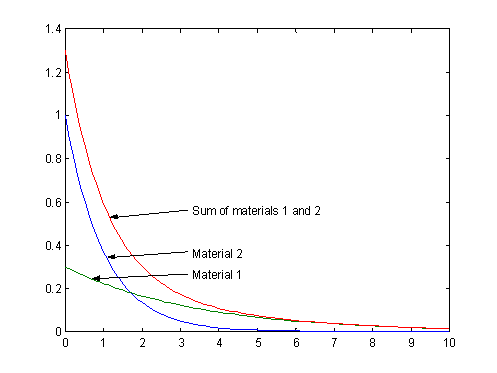
If the decay constants λ1 and λ2 are significantly different from each other, then one material decays away much more quickly than the other so that the sum of their count rates is like that shown in red in the figure below.
Because radioactive decay is a statistical process, the actual numbers of counts that are detected do not exactly match this sum of exponentials, but they should be close. The count rate data at one-minute intervals is given in Table 2 below (these are the same numbers as in Problem 2, they've just been labeled Time and C.R. instead of x and y).
Table 2
| Time | 0 | 1 | 2 | 3 | 4 | 5 | 6 | 7 | 8 | 9 | 10 |
| C.R. | 12011 | 5311 | 2696 | 1595 | 1086 | 805 | 627 | 499 | 409 | 332 | 271 |
To solve this problem, instead of trying to write a program that solves the entire problem, work on the problem in pieces, extending the program to solve the next piece each time:
First, simply put the commands to plot the given data points as circles, in a MATLAB m-file (i.e., script).
Find λ1 and A1 as follows: Assume that the two materials have significantly different decay constants, as in the example plot above. Material 2 eventually (e.g., t > 6) decays away to a negligible count rate and the major contribution to the sum of the two decay rates is from material 1. Extend your MATLAB program to determine the values for λ1 and A1 by considering only the data points for time t > 6, and fit those data points with a simple exponential fit as done in Problem 2. [Note: Since the first time is t = 0, there are 11 times. So, the count rate at time t = 7 is at index 8 in the data vector.]
What are the values of λ1 and A1 that you found?
Using the values of λ1 and A1 that you found in the preceding step, plot the exponential function that approximates material 1 over the range from time t = 0 through time t = 10 in the same plot window as the original data points.
Find λ2 and A2 as follows: From each of the original data points, subtract the estimate of the material 1 count rate data for the corresponding time. What is left is the count rate data for material 2. Extend your MATLAB program to fit this resulting data to an exponential function for the decay of material 2. [Note: You may encounter some negative data values after you subtract away the material 1 function. This is due the random fluctuations in the data introduced by the statistical nature of the radiation counting. You should consider which data points you will use for your fitting to determine the function for material 2, and which you might exclude.]
What are the values of λ2 and A2 that you found?
Using the values of λ2 and A2 that you found, plot the exponential function that approximates material 2 over the range from time t = 0 through time t = 10. Plot this function in the same plot window with the original data points and the plot for material 1.
Finally, plot the sum of the two individual decay functions in the same plot window to demonstrate that you have obtained an accurate estimate of the sum of the two decay processes.
SHOW YOUR PLOT with the data points and all three curves to a Lab Leader.