Call the insideTri() function from the to determine if the point (1.5,0.75) is inside the triangle formed by these three points: (0,0), (2,0), and (1,2).
>> result = insideTri( [ 1.5,0.75] , [0, 2, 1], [0, 0, 2] )
What does the result mean? Is the point inside the triangle or not?
Complete the test_insideTri script.
It is often useful to write functions or program scripts whose sole purpose is to test the correctness of another function. We have provided a header, some comments, and a function that plots triangles and a single point, to help you get started. Save these two m-files in your current directory.
- test_insideTri.m : will be used to test several cases of calling the insideTri function
- plotTriAndPoint.m : plots a triangle and a separate point
In the test_insideTri script, create a separate cell for each of these test cases (so that you can see each plot figure) to the script named test_insideTri.m Each cell should plot and display the results of calling insideTri for its point and triangle combination. The first case has been done for you.
- (4,3) should be inside the triangle (6,2), (4,1), (3,5)
- (4,4) should be outside the triangle (5,6), (2,3), (1,4)
- (3.5,4.5) should be on the triangle (1,4), (2,6), (5,3)
Publish your test_insideTri script to see the test's plot and result.
What do the results mean? Based on these three cases, does insideTri work or not?
Is the point outside of a convex polygon?
We now consider how to determine whether a point is inside or outside of a polygon. We will consider a point that is on the boundary to be inside the polygon. We will first consider convex polygons. A convex polygon is one in which the sides do not bend into the polygon. A good way to describe this is that for any two points inside the polygon, the line between the two points is entirely inside the polygon.
We will make the code that determines whether a point is inside or outside a polygon into a function, just like we did for insideTri. Like insideTri, the insidePoly function will have three input parameters: the coordinates of the point and the vectors containing the x- and y-coordinates of the vertices of the polygon. The output (return) value will be 1 if the point is inside the polygon and 0 if the point is outside the polygon.
-
Save insidePoly.m to your directory:
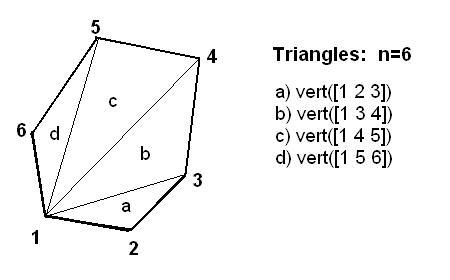
We will divide the polygon into triangles and then check each triangle to determine if the point is inside the triangle. If the point is inside any of the triangles, then the point is inside the polygon. A given a polygon defined by the set of points (xk,yk), for k running from 1 to some integer N, consider the triangles formed by taking the triple of points (x1,y1), (xk-1,yk-1 k-1), and (xk,yk for k going from 3 to N. If the point is inside (or on the boundary) of any one of those triangles, then the point is inside the entire polygon. Notice that by breaking the polygon up into triangles we can make use of the insideTri function we have already written.
Add the following code as the body of your insidePoly function and complete it the function according to the comments:
  = 0;  % initialize the return value of the insidePoly function to 0
N =     % initialize N to the number of vertices of the polygon

for k = 3 : N
    % For each triangle with vertices 1, k-1, and k,
    % check to see if the point is in this triangle;
    % if it is, modify the return value

end
Testing the insidePoly function
We now wish to test our
insidePolyfunction and display its results in a nice format. We will do this by editing ourtest_insidePolyprogram from part a. First, change the call frominsideTritoinsidePoly.-
Add the following code (in the appropriate place) to display the polygon divided into triangles:
hold on for k = 3 : length(a) plot( [a(1), a(k-1), a(k), a(1) ], ... [b(1), b(k-1), b(k), b(1) ], 'g:' ) end hold off -
Run your program using the vertices for a triangle given bleow (since a triangle is a polygon, your code should work on just a triangle).
0 0
1 0
1 3
Here are the vertices for a convex polygon. Run your program using on this polygon.
-1 -1
 2  0
 3  2
 0  4
-3  2
-2  0
-
Add code to your test program to display the message "The point is inside the polygon" or the message "The point is outside the polygon" if the polygon is inside or outside the polygon, respectively. Is the point (2, 3) inside or outside this polygon? Try the program on other points. How does your program work for points on the boundary of two interior triangles? How does your program work for the above data set and the point (1.0, 0.5 ) ? Note: Your insidePoly function will not always work correctly for non-convex polygons.
Is a point inside or outside of a non-convex polygon?
If the polygon is not convex, the rule is more complicated. The reason is that a point may be in more than one of the triangles formed from vertices 1, k-1, and k. Here is the rule to use to determine if a point is in the polygon. Rule: If the point is in an odd number of triangles, it is inside the polygon.
In counting how many triangles a point is in, points on the edges of triangles should count for one-half. To understand why we should count boundary points as one-half, consider how to count points on the edges of interior triangles. Note: This rule may not always work for points that are vertices of the polygon. The remainder function can be useful to determine if a number is odd or even. The value of rem(p,2) is 1 if p is odd and is 0 if p is even. If p is a positive number less than 2, then rem(p,2)is just p.
Modify your insidePoly function so that it incorporates the above rule. Your function should work for both convex and non-convex polygons. Test your Matlab function. Consider the non-convex polygons with the following vertices. Is the point (0, 2) inside or outside polygon #1? Polygon #3 and the point (0,0) is an example for why insideTri returns 0.5 for points on the edges.
| Polygon #1 | Polygon #2 | Polygon #3 |
|---|---|---|
| 0 0 | 1 0 | 1 0 |
| 4 1 | 4 -1 | 4 2 |
| -1 2 | 2 2 | -4 2 |
| 2 3 | 5 3 | -1 0 |
| 1 4 | -1 4 | -4 -2 |
| -1 4 | 0 2 | 4 -2 |
| -2 0 | -1 -5 | |
| 0 -6 |
Appendix: Explanation of the insideTri function
In this appendix we explain how the function insideTri works. We first consider how to determine whether or not a point is inside a triangle. Perhaps the easiest way to determine if a point is inside a triangle is to first determine the barycentric coordinates of the point relative to the three vertex points of the triangle. If all the barycentric coordinates are non-negative, then the point is inside the triangle.
The barycentric coordinates of a point in a triangle represent how to average the three vertex vectors so as to get the vector at the point. The figure below illustrates how the three vertex vectors can be averaged to form the point inside the triangle.
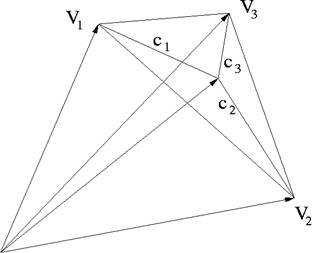
The barycentric coordinates are (c1, c2, c3) and they sum to 1, that is, c1 + c2 + c3 = 1, as is required for an average. For example, the point with barycentric coordinates (1/3, 1/3, 1/3) is always the midpoint of the triangle. The point with barycentric coordinates (1, 0, 0) is (a1, b1), and similarly for the other vertex points. It is easy to convince oneself that if the barycentric coordinates are all positive, then the point must be inside the triangle. On the other hand, if one of the coordinates is negative, then the point is outside.
We now define the barycentric coordinates more mathematically and show how to compute them. Given three vertex points (a1, b1), (a2, b2), and (a3, b3) in the plane and a fourth point (x, y), the barycentric coordinates of (x, y) relative to the vertex points are the three numbers (c1, c2, c3) satisfying this system of equations:
a1c1 + a2c2 + a3c3 = x
b1c1 + b2c2 + b3c3 = y
This is a linear system of equations with the three unknowns (c1, c2, c3). All the other values are given.
The MATLAB commands in the insideTri function solve the linear system for the barycentric coordinates. The three input parameters to insideTri are the coordinates of the point and the vectors containing the coordinates of the vertex points. The arrays a and b contain the x- and y-coordinates for the vertex points, respectively. The matrix A is set up to be the coefficient array for the system of linear equations. The MATLAB command coord = A\[1; x; y] solves for the barycentric coordinates of the point (x, y) relative to the three vertex points and puts the results in the array coord. Notice that coord is a vector and the logical operation all( coord > 0) is true only if all the values of coord are positive. This function illustrates the good programming practice of including comments in the function that explain what the function does and what the input parameters should be.