Project 4: Forest Fires
Due: Tuesday, August 4 by 8:00pm
- Overview
- Modeling a Forest Fire
- Details
- Designing Your Classes
- File Formats
- Tips
- Sample Files
- Working in Pairs
- What to Turn In
Notes
- 7/28: Fixed output files for sample 2.
- 7/27: Don't forget to add comments describing any methods you write (see the Commenting Guide for more info).
Overview
This project has several goals:
- Design and implement a main class and at least one instantiable class
- Read from and write to files
- Implement basic exception handling
- Implement an entire program from scratch
In this project, you will be using a simple model to simulate the spread of forest fires. You will be given a text file that contains a forest configuration. Your program will read in the forest configuration and run the simulation. Finally, your program will output another text file that contains the final forest configuration.
You may work on this project in pairs. See pairs for more information.
Modeling a Forest Fire
We will model a forest as an n-by-n grid (e.g., a square 2D array), where each entry in the array represents a location in the forest. Each location represents one of three states:
- empty: the location contains no tree or a burnt tree
- tree: the location contains a non-burning tree
- burning: the location contains a burning tree
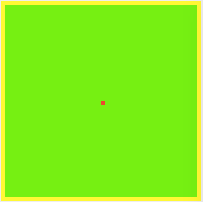
Here's an image of what an initial forest configuration might look like. In this image, empty is shown in yellow, tree is shown in green, and burning is shown in red. The example images show a forest that is 50 x 50.
How fire spreads
To model the spread of a fire, we define a function spread. At each step in the simulation, we apply spread to each location in the forest to determine its state at the next step. A location's state at the next step depends on the location(site)'s current state and the values of its neighbors to the north (N), east (E), south (S), and west (W).

The model uses different rules for different current states:
If a location is empty: it remains empty at the next time step.
If a location is burning: it will burn down in one time step, so it becomes empty at the next time step.
If a location is tree: it may or may not catch fire at the next step due to a fire at a neighboring site. Thus, it may be tree or burning at the next step. We explore this next.
Determining whether a tree catches fire: We must also consider that there is some probability, probCatch of a tree catching fire if a tree in a neighboring cell is on fire. If a location is tree and fire threatens the tree, probCatch is the probability that the tree will catch fire at the next time step.
Suppose that the probability of a tree catching fire is 15%; probCatch = 0.15. For each location representing the tree state, we generate a random number [0.0,1.0). On average, 15% of the time this random number is less than 0.15, while 85% of the time the number is greater than or equal to 0.15.
We use the following logic to determine if a tree catches fire:
if site is tree and (at least one of N,E,S,W are burning)
    if a random number between 0.0 and 1.0 is less than probCatch
        site burns
    else
        site remains tree
Thus, even if a tree has the potential to catch fire because of a neighboring fire, it may not.
NOTE: In your program, you will use a class we have provided, RNG, for random number generation. RNG is very similar to the Dice class from Projects 2 and 3 and has a method next(boolean isPredictable); this method will return a double in the range [0.0,1.0).
Applying spread to each location in the forest
To run our simulation, we represent the passing of time and the state of the forest at each time step. At each time step, the simulation determines the state of each location at the next time step based on the state of each location at the current time. Thus, the program runs a simulation by counting time steps and at each one producing a new grid for the next time step.
We define a function applySpread that takes a forest and a probability of the fire spreading to a location (probCatch) and returns another forest with spread applied to each location in the forest. The function applySpread applies spread(site, N, E, S, W) to each internal location in the forest--that is, applySpread does not process the locations on the boundary. Boundary locations should remain unchanged in subsequent time steps.
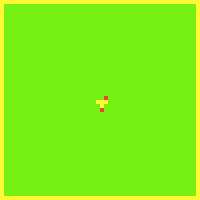
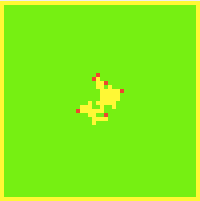
Here are some images of what the forest might look like after some number of iterations. In these images, probCatch is 0.5.
 |
 |
 |
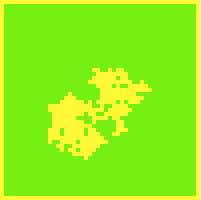 |
| 1 step | 2 steps | 10 steps | 50 steps |
Details
Your program will begin by displaying the title "Forest Fire Simulation" and prompting the user for the name of a text file that contains a forest configuration (in this format), as well as the probability of a fire spreading (this will be probCatch), and the number of steps to run in the simulation:
Forest Fire Simulation
Enter a filename: forest_50_50.txt
Enter a probability of fire spreading: .3
Enter a number of steps: 10
Your program will then:
- read in a file (using a Scanner),
- perform the simulation the specified number of times (steps), and
- write the new forest configuration to a new file (in the same format as the input file).
Naming the Output File
To name your output file, you should prepend the number of steps to the original file name. E.g., if the input file was forest_50_50.txt and your simulation ran for 10 steps, the output file should be named 10_steps_forest_50_50.txt.
End of the Program
At the end of your program, you should print out the following message, replacing output-file with the name of the new forest configuration file you have output.
Wrote new forest configuration to output-fileE.g., the above program should print out:
Wrote new forest configuration to 10_steps_forest_50_50.txt
Handling Exceptions
You will need to implement basic exception handling in your program. In particular, you will need to use proper exception handling to handle any checked exceptions that may be thrown during file input and output. If an exception occurs, you should print the Exception to the console and then call System.exit(1).
Designing Your Classes
Main class
Your main class must be named ForestFire and contain a main method that will be used to launch your program.
Instantiable Classes
You must define at least one instantiable class as part of your program. How you design this class (or classes) is up to you.
Before you begin implementation, you should plan what instantiable class or classes you will build. What parts of this simulation would work well as Objects? Decide what methods and instance variables you will need for each class.
Each class must be defined in its own Java file.
File Formats
The file format is the same for files that you read in and files that your program writes out:
- The first line contains the width and height of the forest, separated by a comma
- All other lines contain a "row" of the forest, where each location in the forest
is specified as follows (locations are comma separated):
- E - indicates the location is empty
- T - indicates the location contains a tree
- B - indicates the location is burning
Here's the contents of a sample file:
5,5
E,E,E,E,E
E,T,T,T,E
E,T,B,T,E
E,T,T,T,E
E,E,E,E,E
Tips
- To get started, you should create a new Java Project in Eclipse. Download the provided random number generator (RNG.java) and add this file to your project.
- We'll talk about Exceptions on 7/27 and Files and File input and output on 7/28. You can work on building your instantiable class(es) before then, or you might read ahead a little. You'll see that File input uses a Scanner, just like we did for user input from the console.
- As you build your program, you may find it useful to visualize the files you are reading in and writing back out (i.e., generate images, as shown above in the project description). We have provided a ForestFireGUI class (in a JAR file) that will allow you to perform these visualizations if you think they will be useful. You can download ForestFireGUI.jar, and you can read about how to use this class in its Javadoc. See Project 3 for directions on using a JAR file. Your final program should not use the ForestFireGUI class.
- You may also find it useful to first build a version of the spread that does not use the random number generator (or set probCatch to 1) so that you can see what happens if the fire always spreads. Once you are confident in your spread and applySpread methods, update spread to use the random number generator as specified.
Sample Files
Sample 1: Sample files
This sample was generated with SEED=1 in RNG.java and
a probability of fire spreading of 0.5.
Sample 2: Sample files
This sample was generated with SEED=1 in RNG.java and
a probability of fire spreading of 1.0.
Working in Pairs
For the project, you may work in pairs. Both partners must be currently enrolled in CS 302-001. If you choose to work with a partner, you must follow the rules below. These rules are the same as for Project 2.
Rules for Pair Programming
- You may only have one partner for this project
- You may have a different partner for future projects
- You may not pair program with multiple partners on the same project
- Once you start working with a partner on a project, you must complete the project with that partner.
- You must list your partner as a collaborator in the header comments of your source files
- Only one partner will submit .java files via the Dropbox for this project. However, both partners must submit a README file that lists the full names of both partners
- You must follow the principles of pair programming summarized below
Principles of Pair Programming
This summary of pair principle principles was summarized by Finn Kuusisto from a paper by Williams and Kessler:
- Pair programming involves two people working together at one computer, continuously collaborating on design, coding, and testing. One person types; the other either provides directions ("Now we need to write a new method that does ..., Now we need a loop to do ...") or constantly reviews what the typer is doing, and provides comments.
- Pair programming has proved successful both in classes and in industry. Programmers usually report having more confidence in their solutions and enjoying programming more when working in pairs.
- It is important to switch roles often (slide the keyboard back and forth). Because pair programming can be quite intense, it is also a good idea to take breaks (to check e-mail, go for a walk, have a snack).
- It is important to provide honest but friendly feedback. To be effective, there needs to be some healthy disagreement and debate, but pairs also need to be respectful of each other, and try to avoid becoming defensive when receiving criticism.
- Inevitably, programmers do some independent thinking/working. For best results, that work should be reviewed by both partners (and perhaps revised) when they start working together again.
- To be successful, pair programmers must realize that the benefits of working together outweigh their usual preference for working alone, they must confidently share their work, accepting instruction and suggestions for improvement in order to improve their own skills and the code they are writing, and they must accept ownership of their partner's work and thus be willing to constructively express criticism and suggest improvements.
What to Turn In
Before you submit your work, check the following:
- Does your program contain a main class and at least one instantiable class?
- Is your main class named ForestFire in a file ForestFire.java?
- Are any instantiable classes you defined in their own Java files?
- Does your implementation of the spread function use the provided RNG class?
- Does your program catch all checked exceptions associated with File input and output?
- Does your program match the sample output?
- Does your program write out a new file of the specified format, with the specified name?
- If you used ForestFireGUI while developing your program, did you remove references to this class in the final version of your program?
- If you worked on your own computer, did you verify that your program works correctly on a lab computer?
- Did you follow the style and commenting guidelines?
To submit:
- Upload your .java files to the Project 4 Dropbox folder on Learn@UW
- Do not upload RNG.java.
- If you worked with a partner: only one partner should submit .java files. Both partners must submit a README file that contains the full names of both partners.
Adapated from http://nifty.stanford.edu/2007/shiflet-fire/ by Angela B. Shiflet.