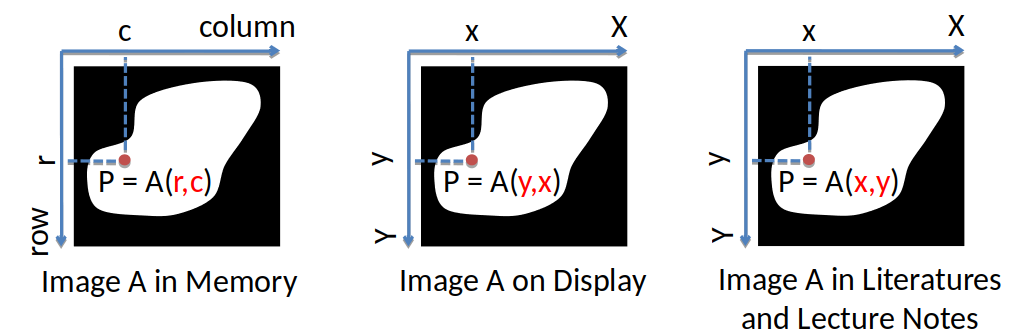
An image is represented as an array in Python. Grayscale images are represented as an m x n array, where m represents the number of rows in the array (the height), and n the number of columns (the width). This can sometimes surprise our expectations of the image being width x height, as we see in descriptions of screen resolutions (1920 x 1080 etc.)
A color (RGB) image is represented as an m x n x 3 array, where the three "slices" represent the red, green, and the blue channels of the image.
Elements in Python NumPy arrays are accessed through indexing: the first element of the index refers to the location along the first axis, the second element to the second axis, and so on -- for example, if you'd want to see the element in the 2nd row and the 4th column of a 3 x 5 array A, you'd use the expression A[0, 3].
NOTE: Python NumPy arrays are 0-indexed. This is important and can cause many (many!) bugs if you are not careful.
Since images are stored as arrays in Python, pixels have to be accessed as you would elements in any Python array. This is somewhat different from the convention in the computer vision literature, as summarized in the following picture:
The difference can often be a source of confusion (and may be a source of bugs in your code).