ACDelco Radiators & Heating Components Best Books of the Month Shop Costumes Learn more nav_sap_plcc_6M_fly_beacon $5 Albums All-New Fire TV Stick with Voice Remote Grocery Introducing Handmade Find the Best Purina Pro Plan for Your Pet Amazon Gift Card Offer redoaks redoaks redoaks  Amazon Echo Starting at $49.99 Kindle Voyage AutoRip in CDs & Vinyl Shop Now Learn more
Qty:1
StarTech.com DVI Dual-Vid... has been added to your Cart

Other Sellers on Amazon
Lowest price: Refurbished
$124.29
+ Free Shipping
Sold by: antonline
Seller Rating: 4.7 out of 5 stars (477605)
Add to Cart
Buy New
$143.58
+ Free Shipping
Buy New
$143.59
+ Free Shipping
Have one to sell? Sell on Amazon

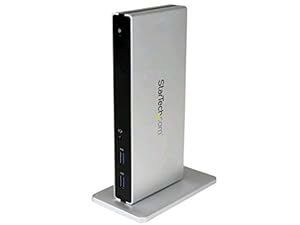
StarTech.com DVI Dual-Video Docking Station for Laptops - HDMI and VGA Adapters - USB 3.0 - Universal Laptop Dock

119 customer reviews
| 5 answered questions

List Price: $183.99
Price: $131.49 & FREE Shipping. Details
You Save: $52.50 (29%)
Only 6 left in stock (more on the way).
Ships from and sold by Amazon.com. Gift-wrap available.
2x DVI/HDMI/VGA
Black & silver
  • Create a powerful office workstation for your MacBook or Ultrabook
  • Compatible with most USB 3.0-enabled laptops including Lenovo Thinkpad E540 & X1 Carbon / HP EliteBook Folio 9470m / Microsoft Surface Pro 3
  • Comparable to Lenovo ThinkPad Basic 0A33970 / HP 3005pr
  • Universal USB 3.0 Laptop Docking Station / Dual DVI w/ HDMI & VGA Adapters / 2x USB Fast-Charge Ports
  • Dock is perfect for shared workspaces & hot desks / BYOD
  • Vertical or horizontal orientation
  • Matte silver sand blast finish
68 new 1 refurbished from $124.29
$131.49 & FREE Shipping. Details Only 6 left in stock (more on the way). Ships from and sold by Amazon.com. Gift-wrap available.

Frequently Bought Together

  • StarTech.com DVI Dual-Video Docking Station for Laptops - HDMI and VGA Adapters - USB 3.0 - Universal Laptop Dock
  • +
  • Logitech Wireless Combo Mk520 With Keyboard and Mouse
Total price: $166.48
Buy the selected items together

Product Description

Size:2x DVI/HDMI/VGA  |  Color:Black & silver

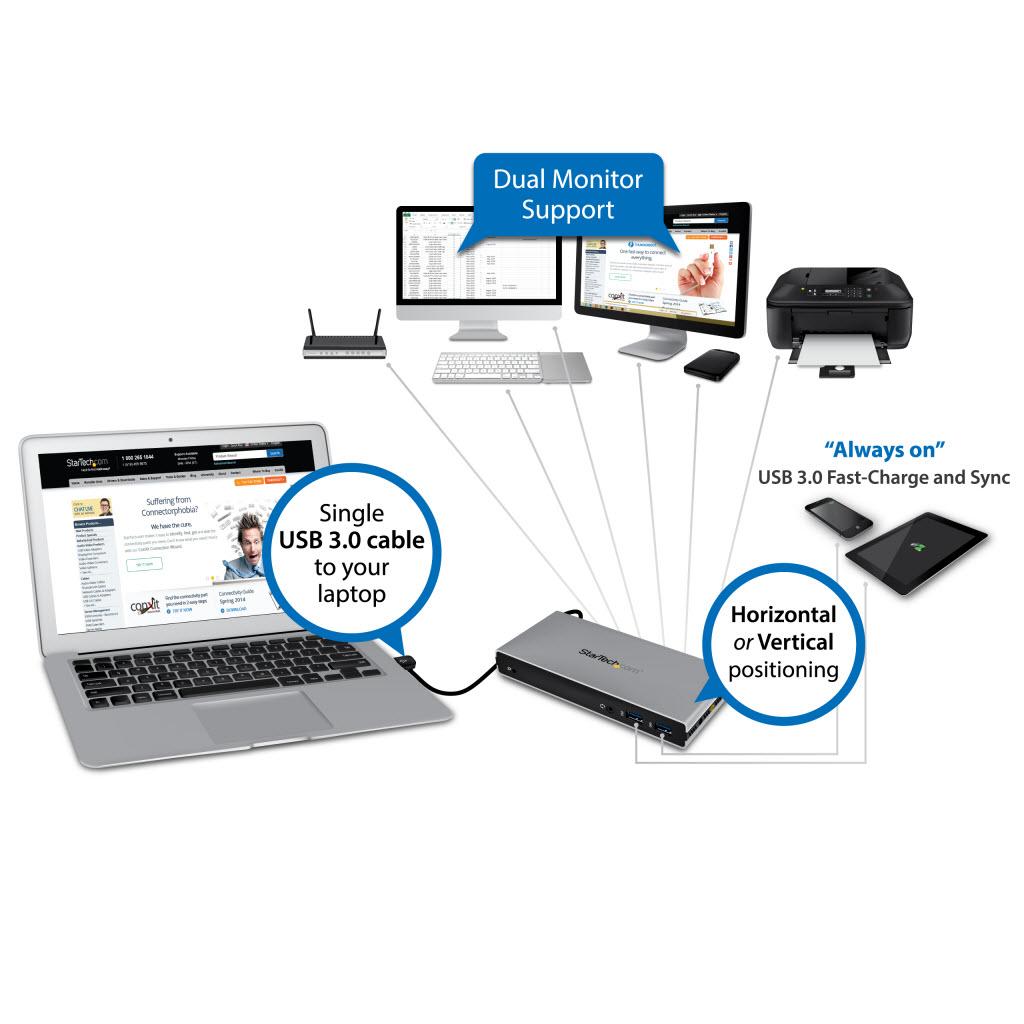
Add 2x DVI, or HDMI® or VGA, 2x USB Fast-Charging ports, USB 3.0 Hub w/UASP, Gigabit Ethernet, and audio to your MacBook®, Ultrabook™ or laptop through a USB 3.0 cable - The USB3SDOCKDD USB 3.0 Laptop Docking Station delivers display flexibility, faster device charging, and desktop convenience to your home or office workstation. From just a single connection point, the docking station instantly adds two DVI ports plus HDMI® and VGA adapters, a USB 3.0 hub with two quick-charge ports, Gigabit Ethernet, and a 3.5mm headset jack to your USB 3.0-equipped laptop, for hassle-free docking. Display Flexibility Discover multi-monitor freedom! Boost your productivity by adding dual monitor support to your workstation with one of the only docking stations to offer dual DVI video ports each delivering resolutions up to 1920x1200. For extra display flexibility we’ve included two DVI video adapters, letting you avoid the frustration and costs of purchasing additional products just to fit the displays you already use. Leave the stress of interface limitations at the door by adapting to the most popular monitor types right out of the box. No hassle, no headaches. Device Charging Charge your mobile devices faster, with or without a laptop connected to the dock. USB charging is convenient, fast, and accessible through two front “always on” USB fast-charge ports, combining data throughput with support for USB Battery Charging Specification 1.2 — You can simultaneously maintain work efficiency while adding charge and sync flexibility for up to two mobile devices (2 tablets or 1 tablet/1 smartphone). Now, you can easily charge other devices while connected to multiple displays, a Gigabit network, and numerous USB peripherals through the integrated 5-port USB 3.0 controller. Perfect for external USB 3.0 hard drives, the docking station supports UASP-enhanced performance for faster data transfer rates, which means less waiting and more productivity. Desktop Convenience Save time and get more work done! With a single connection to a single laptop (e.g. MacBook Pro®, MacBook Air®, Lenovo®, ThinkPad®, HP® or Dell® Ultrabook™) your required peripherals remain connected. Overcome your laptop port limitations and reduce the hassle of constantly reconnecting devices, to create an organized and full-sized workstation with less clutter that's great for “hot desking”. Plus, for a clean and customized workspace you can position the docking station in horizontal orientation, or upright (tower), using the included optional stand. Backed by a StarTech.com 2-year warranty and free lifetime technical support.


Product Details

Size: 2x DVI/HDMI/VGA | Color: Black & silver
  • Product Dimensions: 9.1 x 6.7 x 3 inches ; 1.2 pounds
  • Shipping Weight: 2.2 pounds (View shipping rates and policies)
  • Domestic Shipping: Item can be shipped within U.S.
  • International Shipping: This item can be shipped to select countries outside of the U.S. Learn More
  • ASIN: B00LVA3NMU
  • Item model number: USB3SDOCKDD
  • Average Customer Review: 3.6 out of 5 stars  See all reviews (119 customer reviews)
  • Amazon Best Sellers Rank: #4,094 in Computers & Accessories (See Top 100 in Computers & Accessories)
  • Manufacturer’s warranty can be requested from customer service. Click here to make a request to customer service.
  • Date first available at Amazon.com: July 16, 2014

From the Manufacturer

Universal USB 3.0 Laptop Docking Station w/ Dual DVI Video

Universal USB 3.0 Laptop Docking Station

The USB3SDOCKDD delivers display flexibility, fast device charging, and desktop convenience to your home or office workstation. From just a single connection point, the dock instantly adds two DVI ports plus HDMI and VGA adapters, a USB 3.0 hub with two quick-charge ports, Gigabit Ethernet, and a 3.5mm headset jack to your USB 3.0-equipped laptop, for hassle-free docking.

USB 3.0 Dual DVI Laptop Dock

Display Flexibility

Device Charging

Desktop Convenience

Display Flexibility

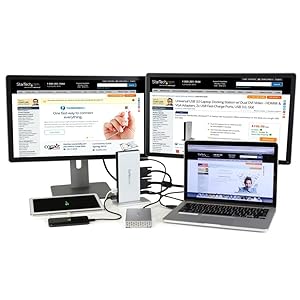
Discover multi-monitor freedom! Boost your productivity by adding dual monitor support to your workstation with one of the only docking stations to offer dual DVI video ports each delivering resolutions up to 2048x1152.

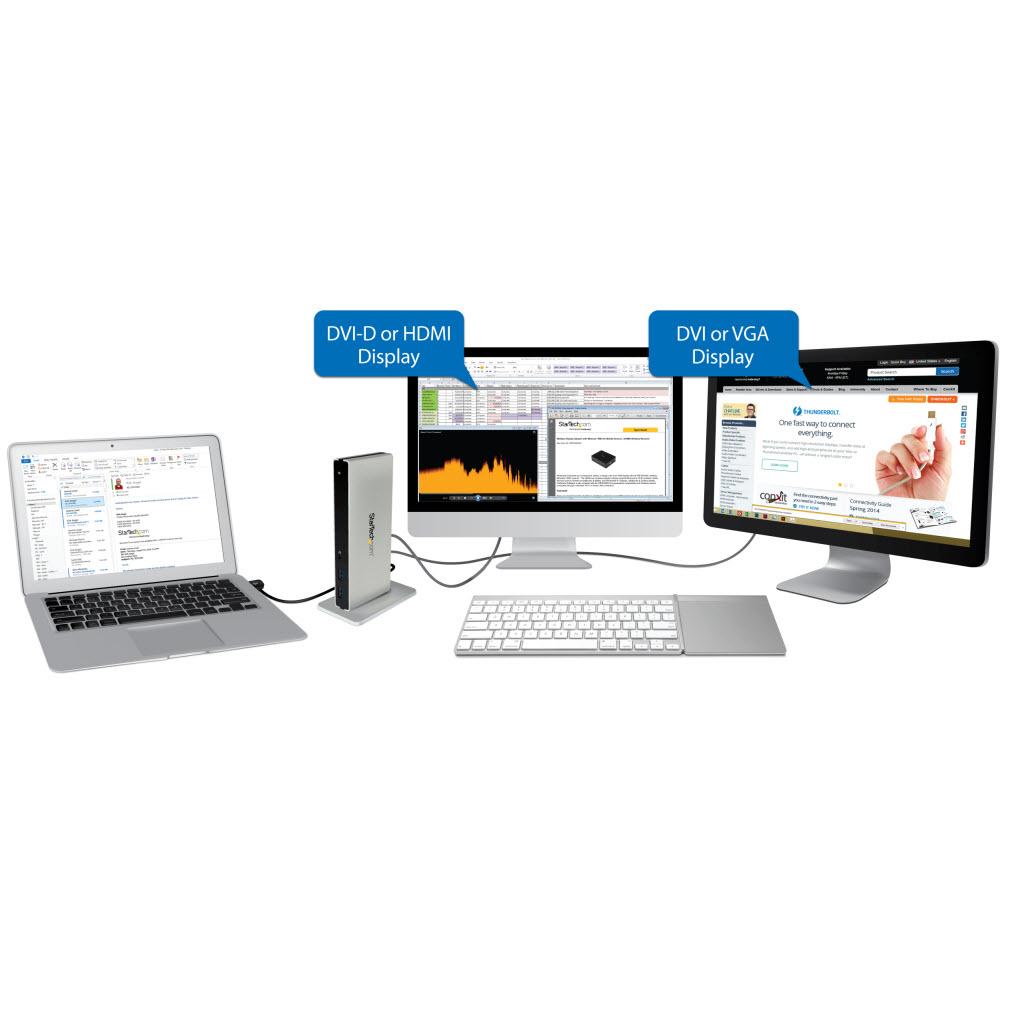
For extra display flexibility we have included two DVI video adapters, letting you avoid the frustration and costs of purchasing additional products just to fit the displays you already use. Leave the stress of interface limitations at the door by adapting to the most popular monitor types right out of the box. No hassle, no headaches.

Device Charging

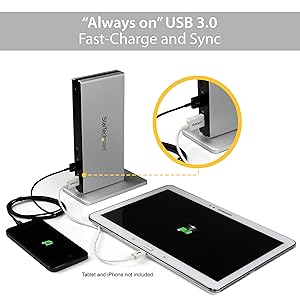
Charge your mobile devices faster, with or without a laptop connected to the dock. USB charging is convenient, fast, and accessible through two front 'always on' USB fast-charge ports, combining data throughout with support for USB Battery Charging Specification 1.2 — You can simultaneously maintain work efficiency while adding charge and sync flexibility for up to two mobile devices (2 tablets or 1 tablet/1 smartphone).

Now, you can easily charge other devices while connected to multiple displays, a Gigabit network, and numerous USB peripherals through the integrated 5-port USB 3.0 controller. Perfect for external USB 3.0 hard drives, the docking station supports UASP-enhanced performance for faster data transfer rates, which means less waiting and more productivity.

Desktop Convenience

Save time and get more work done! With a single connection to a single laptop (e.g. MacBook Pro, MacBook Air, Lenovo ThinkPad, HP or Dell Ultrabook) your required peripherals remain connected. Overcome your laptop port limitations and reduce the hassle of constantly reconnecting devices, to create an organized and full-sized workstation with less clutter that's great for 'hot desking'.

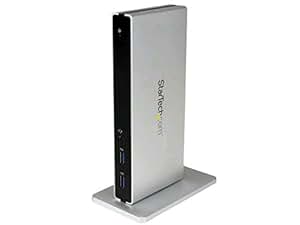
Plus, for a clean and customized workspace, you can position the docking station in horizontal orientation, or upright (tower), using the included optional stand.

Applications

Turn your MacBook, Ultrabook or laptop into a powerful office workstation via a single USB 3.0 cable

-Connect multiple monitors in a variety of flexible display combinations right out-of-the-box

-Create a shared workspace or hot desk with an integrated charging station for guests, customers, and colleagues

-Connect a wide variety of peripherals at home / office to a laptop, all from a single USB 3.0 connection

-Neatly set up in mixed environments with upright or horizontal positioning through

-Perfect for use with your MacBook or Ultrabook, with aesthetically matching silver sand blast housing

StarTech Packaging

Look for StarTech Branded Packaging to ensure you are getting a genuine StarTech product

What's in the Box

1 - USB 3.0 Laptop Docking Station

1 - 1m USB 3.0 Cable

4 - Rubber Feet

1 - Stand

2 - Stand Screws

1 - Screwdriver

1 - DVI to VGA Adapter

1 - DVI to HDMI Adapter

1 - Universal Power Adapter (NA/UK/EU)

1 - Driver CD

1 - Instruction Manual

Features

  • Dual DVI output
  • 2x USB 3.0 Fast-charge & Sync ports - Charge devices without a host connection
  • Vertical or horizontal dock orientation
  • 5x USB 3.0 data throughput ports (2x front ports USB Battery Charging Specification 1.2 compliant, and 3x rear ports)
  • 3.5mm 4-Position TRRS Headset port
  • Gigabit Ethernet RJ45 Port with Wake-on-LAN (WOL)
  • Matte silver sand blast finish
  • Includes 1m USB 3.0 host cable, stand, and rubber feet

Customer Questions & Answers

Customer Reviews

Most Helpful Customer Reviews

46 of 50 people found the following review helpful By MorningZ on January 24, 2014
Size: HDMI/Thunderbolt/Mini DisplayPortColor: Black & silver Verified Purchase
So I purchased this dock last week after the recent purchase of a new 13" Macbook Pro Retina. It's really nice to be able to hook up the one (included) Thunderbolt cable and get sound, wired internet, looped TB output to a monitor, and two of my USB devices all hooked up in that one shot.

With that noted, it drives me crazy that the dock doesn't fully work when my laptop comes out of sleep mode. I do get video output through the TB output of it, but no wired ethernet or sound from the headphone jack *unless* I unplug the Thunderbolt cable from the laptop and plug it back in, then everything works again.

If this issue got fixed, I would give this 5 stars in a heart beat
4 Comments Was this review helpful to you? Yes No Sending feedback...
Thank you for your feedback.
Sorry, we failed to record your vote. Please try again
Report abuse
36 of 39 people found the following review helpful By surf1 on March 7, 2014
Size: HDMI/Thunderbolt/Mini DisplayPortColor: Black & silver Verified Purchase
Had planned on using this for dual monitors, one from thunderbolt, one from HDMI. When I attempted to use it this way, the HDMI did not allow the thunderbolt port to accept DVI or VGA adapters. Called Startech and they confirmed. Was disappointed because if there are limits on use of a port that should be noted. Otherwise the station was easy to use and seemed to work well.
9 Comments Was this review helpful to you? Yes No Sending feedback...
Thank you for your feedback.
Sorry, we failed to record your vote. Please try again
Report abuse
28 of 31 people found the following review helpful By Robert Cozzi on January 27, 2014
Size: HDMI/Thunderbolt/Mini DisplayPortColor: Black & silver Verified Purchase
I've been waiting for the CalDigit version of a thunderbolt hub since 2013 CES (for over a year) so I opted for this one from Startech since the reviews were primarily good.

Right out of the box I plugged it in, connected the cables and then connected it to my Macbook Pro and it started working.
No issues at all.
I recommend that users of Apple products get to this point and stop, let it "just work".
I'm in the IT business but do not work professionally with Apple products. But I decided I should check if there were a newer driver or some type of software update for this device. There was one on the startech.com website for Windows and for Mac. So I downloaded it, and installed it. WARNING!!!! From the moment the software was installed I could no longer connect to any Network port, not the one in the startech unit, not the one built into the Macbook Pro, not the wifi. Nothing.
Recovery: The only way I could recover was to hold down Cmd+R while powering up and boot into Recovery mode. Then I pulled down the operating system from the Internet--while in this mode, the computer does not use the installed network drivers so the internet connection was live for recovery mode. It too about an hour but when I re-booted, it came right up and the StarTech unit works again. I will continue to use it as is, and not upgrade its software.
WHY DID I TRY TO UPGRADE? I updated the software because the Thunderbolt port is being used to connect to the StarTech and then to an external disk drive. I use HDMI for my display. The Drive's access speed while connected through the StarTech is horribly SLOW. So much so that I thought something was wrong with it, so I updated the its software and, well, you know that story.
Read more ›
Comment Was this review helpful to you? Yes No Sending feedback...
Thank you for your feedback.
Sorry, we failed to record your vote. Please try again
Report abuse
Size: HDMI/Thunderbolt/Mini DisplayPortColor: Black & silver Verified Purchase
I've got a 2011 MacBook Pro and for years I've wanted to add reliable USB 3.0 to it so I could use the wealth of current generation storage devices. Each device I tried (using the ExpressCard slot) was unreliable and you had to do backflips to find a driver on Chinese web sites and hope that they would work... only to find them either corrupt your data or stop working entirely when a new OSX update rolled out.

This device uses the same chipset that is inside the current generation Macs, so if you use the latest OSX, it does not require any drivers.

Two more advantages:

1. Thunderbolt pass-through... For me this is HUGE deal, because my MacBook only has one Thunderbolt port, and no HDMI port, so my monitor is in the Thunderbolt port and it needs to be at the end of the chain... plus I have some Thunderbolt drives that do not have pass-through... essentially preventing me from using the drives and my monitor at the same time.

2. HDMI... Some Thunderbolt docks don't have HDMI ports, so even though they have pass-through, you still lose the port if you are using it for a monitor.

3. This device has 3 USB 3.0 ports. Some docks only have one.

4. Gigabit Ethernet port. For laptop users, this is a big deal. It lets you plug your LAN directly to the dock so you don't have to keep it tethered to the MacBook. This not only saves wear and tear on the plug, but it essentially lets you have just one cable coming from the dock to the MacBook. As a bonus, you can address the Ethernet port as a second port if you want to connect to more than one network.

5. The Thunderbolt cable is INCLUDED. This may not sound like a big deal, but Thunderbolt cables are expensive. I was happily surprised to see that they included one in the box.
2 Comments Was this review helpful to you? Yes No Sending feedback...
Thank you for your feedback.
Sorry, we failed to record your vote. Please try again
Report abuse
9 of 9 people found the following review helpful By Cold Case on August 7, 2014
Size: HDMI/Thunderbolt/Mini DisplayPortColor: Black & silver Verified Purchase
I use this dock with a Mac rMBP, OS 10.9.4, LaCie Big 5, and a LG display port monitor. Performance is impressive, matches or exceeds the rMBP USB3 port. The dock gets warm near the top, but not hot. I have it mounted on the end similar to the photo, and the base provided is nicely weighted.

When this dock is first in the TB chain, followed by the LaCie disk enclosure, followed by the display port monitor everything seems to work fine. Mix things up and there are sleep issues. Documentation and on line info clearly identify monitor support, where before it may have not been obvious to the casual user. It will support two monitors but only if one is a thunderbolt monitor and the other HDMI.

I need more than 3 USB ports, so I plugged my old pluggable brand 7 port USB 3 hub into one of the Startech ports and everything seems to work fine. I have a USB3 disk enclosure on both the Startech and one of the Hub and disk benchmarks are near the same as before (USB Hub connected to rMBP USB port). I have a portable USB3 SSD connected to the third Startech port and the dock powers it nicely. My other drives are self powered.

Typically a USB3 chipset will have 4 ports and so does the one Startech uses, but one of the ports is used for audio. To the rMBP it looks like a USB audio device. I'd rather have another USB port, but then is is nice to be able to control volume from the keyboard.

It has a quality look an fell, and comes with a TB cable as well as three different AC power cables. The TB cable is a little short but the power cables are much longer than the usual. Makes no sound. When waking or powering up, there is a little pop from the audio amp I have plugged in. A pop is to be expected expected, but its much smaller than others.. not obtrusive. The power supply brick is almost as large as the dock and stays relatively cool.

Hopefully this will be a durable product, so far so good.
Comment Was this review helpful to you? Yes No Sending feedback...
Thank you for your feedback.
Sorry, we failed to record your vote. Please try again
Report abuse

Most Recent Customer Reviews

Set up an Amazon Giveaway

Amazon Giveaway allows you to run promotional giveaways in order to create buzz, reward your audience, and attract new followers and customers. Learn more
StarTech.com DVI Dual-Video Docking Station for Laptops - HDMI and VGA Adapters - USB 3.0 - Universal Laptop Dock
This item: StarTech.com DVI Dual-Video Docking Station for Laptops - HDMI and VGA Adapters - USB 3.0 - Universal Laptop Dock
Price: $131.49
Ships from and sold by Amazon.com