Prev: W12, Next: W14
Links: Zoom, TopHat (010339, or Form), Calculator:
Slide:
# Skip Lists
📗 Skip lists introduce "express lanes" into sorted linked list.
📗 \(N\): the number of keys in list.
📗 Steps for lookup on every lane:
➩ Peek ahead, then either:
➩ Move to slower lane, or
➩ Take 1 step ahead, then move to slower lane.
📗 With \(\log_{2}\left(N\right)\) lanes: \(O\left(\log\left(N\right)\right)\).
📗 Visualization: Link.
# Skip List Insertion
📗 Flip coin for each lane \(>0\) from lowest to highest:
➩ Heads: new key is on lane.
➩ Tails: new key is not on lane, and we stop flipping.
📗 Perform lookup for new key and insert it into each of the lanes it is on.
# Insertion Example
ID:📗 [1 point] Insert the key: .
➩ Coin: or with probability of heads =
List:
➩ random integers between and :
# Skip List Deletion
📗 Perform lookup for key to delete, but do not step into node containing key.
📗 Delete key from every lane it is on while continuing lookup procedure.
# Readings
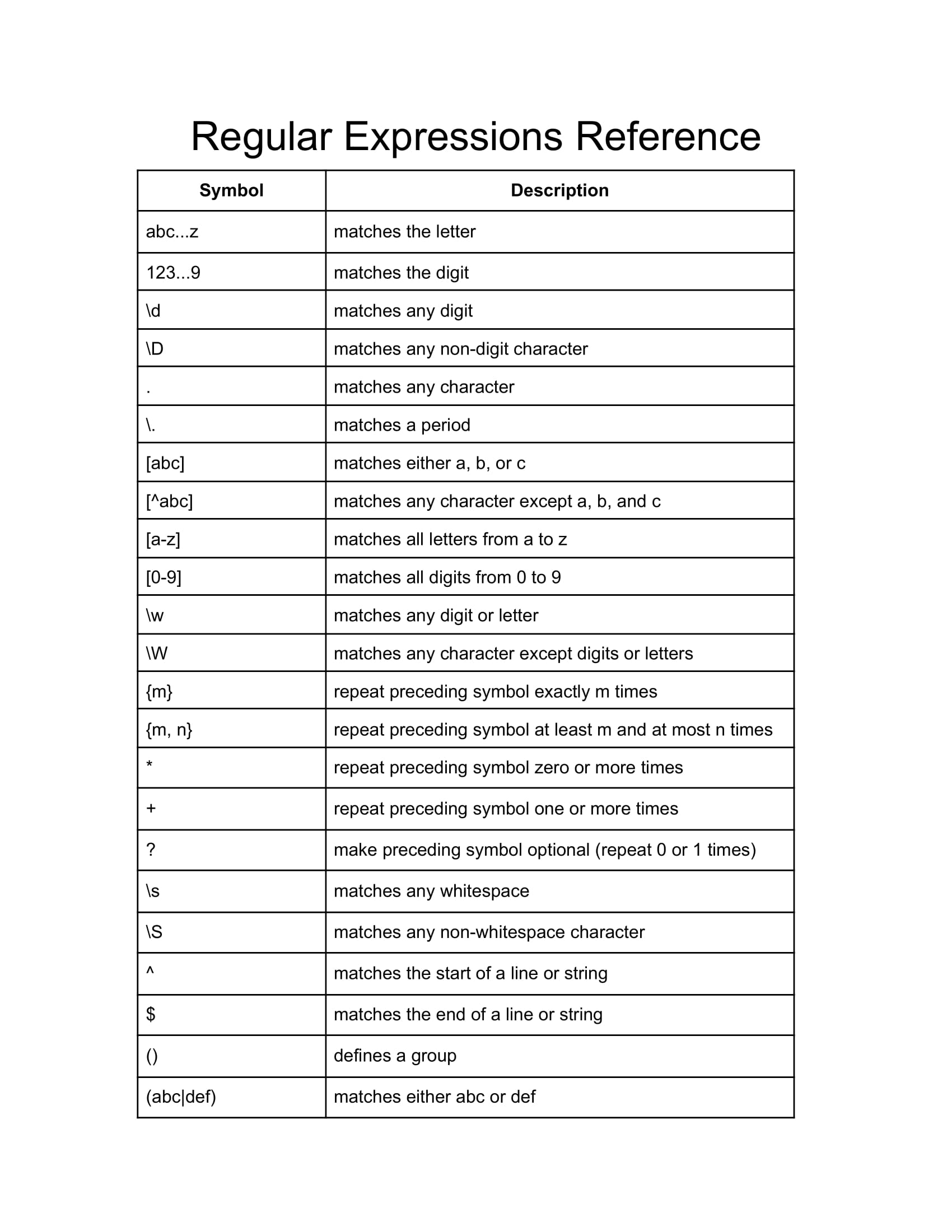
📗 Practice and debug regular expressions: Link.
📗 Work through a tutorial for regular expressions: Link.
📗 Regular Expression Reference
# Activities
📗 Write Java code to find:
➩ # occurrences of the word Comedy in movies.csv.
➩ # prices that end with the digit 2 in cars.csv.
➩ # songs with two word titles in songs.csv.
➩ # ingredients with 1000 or more calories per 100 grams in ingredients.csv.
➩ # meteorites with year 20XX where XX is any number in meteorites.csv.
📗 In Bash,
➩
grep is global regular expression print. ➩
-P is Perl-compatible regex. ➩
-i ignores case. ➩
-v inverts the match (lines that do not match). ➩
-c counts the number of lines matched. ➩
-n shows the line numbers of the matches. ➩
-o prints only the matching part. # Bash Pipeline
📗 Bash commands can be chained in a way similar to Java streams using the Pipe operator |.
➩ Count the number of lines
-l, words -w, and characters -m: grep -P "Comedy" movies.csv | wc. ➩ Sort the matches:
grep -P "Comedy" movies.csv | sort. ➩ First 10 matches:
grep -P "Comedy" movies.csv | head -n 10. ➩ Last 10 matches:
grep -P "Comedy" movies.csv | tail -n 10. ➩ Unique matches only:
grep -P "Comedy" movies.csv | uniq. 📗 Example: save the first 10 lines starting wiht 1 among the sorted matches to a file:
grep -P "Comedy" movies.csv | grep -P "^" | sort | head -n 10 > file.txt. test lku,ins,del l
📗 Notes and code adapted from the course taught by Professor Florian Heimerl and Ashley Samuelson.
📗 Please use Ctrl+F5 or Shift+F5 or Shift+Command+R or Incognito mode or Private Browsing to refresh the cached JavaScript.
📗 You can expand all the examples and demos: , or print the notes: .
📗 If there is an issue with TopHat during the lectures, please submit your answers on paper (include your Wisc ID and answers) or this Google Form at the end of the lecture.
Prev: W12, Next: W14
Last Updated: August 24, 2026 at 11:39 PM