Page 21: Curve review
Spring 2026 Sample Solution
We covered a lot about curves. To make sure you understood everything, this page has a summary and a few exercises to test your understanding.
Outline of Curve Topics
The main points in the workbooks and lectures about curves:
- The idea of curves, and their basic definitions.
- The idea of parametric representations, where we describe curves as a function of a free parameter.
- The idea of tangents and, more generally, the derivatives of curves.
- The idea of continuity, where we talk about how curve pieces connect to make bigger curves.
- The idea of splines or piecewise polynomial representations, which are the most common way we represent curves in computer graphics.
- The idea of using cubic polynomials for the curve pieces, which is the most common approach in computer graphics.
- The idea of using Hermite interpolation to give easy control over cubics by specifying the beginning and end of each segment.
- The idea of using cardinal interpolation to give easy control over Hermite interpolation by computing the derivatives from the point positions. Catmull-Rom splines are an important special case.
- The reasons why we prefer to do interpolation by using a piecewise polynomial (like a cardinal spline), rather than fewer higher-order pieces (this was emphasized more in the book and lecture).
- The reasons why we often prefer approximating curves to interpolation, to give us better control of a curve shape.
- The nice properties of Bézier curves that make them a very popular choice in graphics applications.
- The geometric derivation of Bézier with the de Casteljau construction, which provides intuition into how the curves work as well as practical algorithms.
- The specific form of Bézier Cubics, which resemble Hermite cubics and are very common in graphics applications.
- The Basis Functions of Bézier curves, which provide a way to evaluate the curves and a sense of the mathematical elegance.
- How Bézier curves are applied in the APIs we use.
- The idea of arc length parameterizations of curves, where the length of the curve is used for parameterization, which allows the parameter to have a more direct connection to location.
These are all important, and it’s a lot, so some practice may be worthwhile.
Drawing Cardinal Splines
todo: solution is not set for box ex-cardinal
Cardinal splines are very useful, but they are not built into the Web APIs. This isn’t a problem because it is easy to convert Cardinal segments to Bézier segments, and APIs can draw Béziers well.
To practice that, here is a Cardinal Spline to draw. In this figure, there are five points to connect with a Cardinal spline; we’ve drawn line segments between the points rather than Cardinals. Replace the line segments with Cardinal splines, so that the picture is . Use Catmull-Rom splines (cardinals with t=0, or s=0.5).
There are two catches here:
- Canvas doesn’t have Cardinal Splines; you must convert each Cardinal segment to a Bézier segment. You need to replace each of the
lineTocommands in 03-21-01.js with abezierCurveTocommand, and compute the positions of the control points. - The spline is “looped” - the last point connects to the first. This means when you need to get the “next” point after the last point, you go around the loop.
view - look at the box and experiment with it
examine - look at the code for the box
edit - change the box's content
rubric - several steps are suggested in the rubric page - form elements on page in rubric
03-21-01.html 03-21-01.js
| Kind
Kind of rubric items: standard - expected from all students advanced - used to get a better grade creative - an opportunity to do something creative levels - rubric item graded by selected achievement level optional - not required, but encouraged |
Description | |
| standard | make a cardinal spline through the points | |
| advanced | draw 20 distinct points on the curve | |
| optional | the 20 points have equal arc-length between consecutive points |
Edit 03-21-01.js to do this exercise.
Observe how the cardinal spline does not fit within the original “control polygon”. You will have Bézier control points outside of the original cardinal control polygon, since the Bézier curve stays inside its control polygon.
Part of 2023 Lecture 11 | Slides
Converting to Beziers is good for drawing the curve. However, if you need to compute points on the curve, you need to do it yourself. To practice this, we add to the “advanced” aspects of this box:
- You must draw 20 points placed around the curve (on the curve). The points should have a different color than the curve itself (so they are clearly visible), and they can be either squares or circles. This requires computing points on the curve.
- (optional) You should space those 20 points equally, using an arc-length parameterization. This will be good practice for the train assignment. While this is good practice for the train, it is more work.
Start by drawing the 20 points equally spaced in parameter space, and then try to make an arc-length parameterization. You will want this for the train (which is coming soon).
Bézier Curve Algorithms
We discussed both algebraic ways to compute Bézier curves (the blending function polynomials) and geometric approaches.
Using the blending functions may be easier or faster for computing values in a program. I find it easier to use de Casteljau when I have to compute things by hand. The de Casteljau algorithm is useful when we need to split curves, and it provides the tangents as part of the computation process.
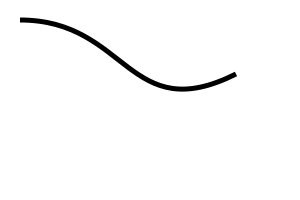
To practice using the de Casteljau algorithm, take the curve in this figure
03-21-02.svg
and split it into three parts with even parameter values (e.g., u=1/3 and 2/3). Take the single curve in the picture and replace it with three curves that are different colors (make the first one red, the second one green, and the third blue) that are geometrically identical. We need to make separate curves because in SVG we haven’t learned to make a single curve with three colors. (Even if you know how to do that, don’t; we will check that your result has 3 separate path statements.)
view - look at the box and experiment with it
examine - look at the code for the box
edit - change the box's content
rubric - several steps are suggested in the rubric page - form elements on page in rubric
03-21-02.html 03-21-02.svg
| Kind
Kind of rubric items: standard - expected from all students advanced - used to get a better grade creative - an opportunity to do something creative levels - rubric item graded by selected achievement level optional - not required, but encouraged |
Description | |
| standard | split the Bezier |
Round numbers to integers (when you do the computations, you may get fractions).
And now to make good use of this…
Move on to Next: Page 22 - The 559 2D UI Code where we will continue preparing for the train assignment.