Page 19: Projective (Homogeneous) Transformations
Spring 2026 Sample Solution
To help you see what the bottom row of the matrix does, here’s a demo that will let you experiment. Try making the bottom middle element negative.
If the bottom middle element is negative, you get a 3D effect. Preview of things to come: this is how we are going to transform 3D objects to our screen with perspective.
But for now, you should notice that we can change parallel lines into lines that intersect (unlike affine transformations). In fact, you can turn a square into any other quadrilateral. It might create a really weird transformation, but it is possible. Try it:
Sometimes, the projection gets so weird that the code to draw the grid doesn’t know how to handle it.
But notice: it does preserve straight lines. If something is straight before the transformation, it is straight after the transformation.
Projective Coordinates
Homogeneous coordinates are sometimes called projective because we need to project points from the higher dimensional space back to our original space. This will be useful when we get to 3D since it will let us do perspective transformation (which involves a projection).
If the bottom row of the projective transformation (the one we apply to homogeneous coordinates) is zero except for a 1 in the lower right corner, the transformation is affine in the original space. If the point we transform starts out with a 1 for its w coordinate, it will end up with a 1 for its w coordinate.
However, if the bottom row of the matrix is not 0,0,1, or the w of the point is not 1, we will end up with a number other than 1 for the new w, and we need to remember to “divide by w” to convert back to 2D when the time comes.
To illustrate how this can work, consider the scaling transformation. We can write it two different ways: Notice that these give the same result. If we transform the 2D point x,y using the first matrix we get (sx,sy,1) or (sx,sy). If we use the second matrix, we get (x,y,1/s), which after division by w (to convert back to 2D) gives us (sx,sy).
Reading Matrices
It is important to understand how the matrices work so we can “read” them to understand what a specific matrix does. This will also let us “write” matrices directly (without having to compose them from multiple simple transformations).
We can read this matrix as follows:
- The first column ( ) tells us the new direction and scale of the x axis. For every unit of x (in ), this vector defines the movement in the new space.
- The second column ( ) tells us the new direction and scale of the y axis.
- The third column ( ) tells us the new position of the origin. It’s where the zero vector will go.
So, we can use this in reverse: if we know the transformation we want, we can create the matrix that achieves that transformation. Consider trying to transform the red box into the blue box:
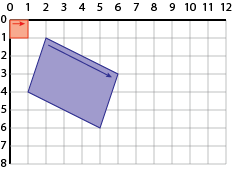
From the picture, we can see that we want the origin to go to (2,1), we want the x axis to go to (4,2) and we want the y axis to go to (-1,3). We can use this to create the matrix:
We could have created this matrix as the composition of basic transformations. But in this case, it was easier just to build the matrix by looking where things went.
Make sure that you can do this! It makes for a good exam question, but it’s also useful when you need to construct matrices to put objects in particular places.
Matrices and Transformations
If we look at the matrix:
We should be able to see that this scales both x and y by a factor of 2, and translates things by 5 in each direction.
We could “apply” this matrix with the code:
|
|
Any points we draw after these transformations, would be affected by the matrix. Canvas actually builds the matrix by multiplying two transformations together:
For computers, it’s easier to multiply matrices. For thinking about transformations, sometimes it is easier to think about what the transformation does and create the matrix. For example, if we want to consider what happens when we reverse the order of the transformations:
|
|
We could multiply the matrices together (and get a different result):
Or, we could think about how the translation now applies in the scaled coordinate system, so it moves things farther. Or we could think about how the translation is applied to the points first, and then scaled (so the translation amount is multiplied). With either of these, we could then build up the new matrix.
Summary
We have made the connection between transformations and matrices. This will allow you to read the books (which discuss transformations in terms of matrices).
Often, this happens inside the graphics API. We compose simple, built-in transformations. However, we can use the matrices in our code, which we will start to do on Next: Page 20 - Matrices in Code.