Page 21: Matrix Exercises
Spring 2026 Sample Solution
Over the past few pages, you saw the connection between the math of transformations and the code we write to draw using Canvas. On this page, you’ll get to try writing some code to test it out.
Hint: remember that the canvas transform allows you to specify an affine transformation as a matrix. It’s up to you to figure out what the matrix should be and put it into the 6 values that are passed to transform. You may want to review the required readings to see the standard forms of the matrices. You can often figure out what the entries of the resulting matrix are using the methods in “Reading Matrices” on page 2, without having to build the matrix up from simple transformations.
In cases where you do need to figure out the transformations, the JavaScript Math library has a useful function that does a 2-argument arctangent. See Math.atan2. Given x and y, it tells you the angle needed for rotation.
Box 1: Exercise 1, Two Dots with Translate, Rotate, and Scale
For this box, you should edit 02-21-01.js (for 02-21-01.html). The function you have to change is at the beginning of the file. Feel free to read the rest of the code - but please don’t change it.
view - look at the box and experiment with it
examine - look at the code for the box
edit - change the box's content
rubric - several steps are suggested in the rubric page - form elements on page in rubric
02-21-01.html 02-21-01.js
| Kind
Kind of rubric items: standard - expected from all students advanced - used to get a better grade creative - an opportunity to do something creative levels - rubric item graded by selected achievement level optional - not required, but encouraged |
Description | |
| standard | red dot stays in red corner and black dot stays in black corner as dots are dragged; square remains square; done via translate, rotate, and scale |
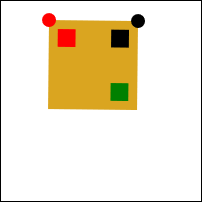
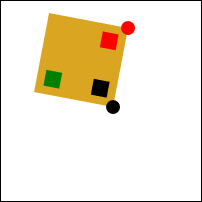
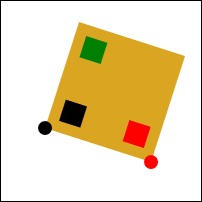
I wrote some UI code that draws the square, draws a red dot for the first point and a black dot for the second point, and lets you move the points around. All you need to do is fill in the function twoDots in
02-21-01.js
with the code that performs the transformation. It should consist of calls to context.translate, context.rotate, and context.scale. I put in a context.translate just to get you started. You can drag around the dots to make sure your code works (the graders will do it).
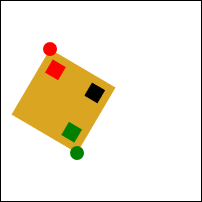
Here are some snapshots of what this should look like when it is working:
Box 2: Exercise 2, Two Dots with Transform
Now, do that again, but this time do it using context.transform - compute the 6 numbers that need to be passed. Do this in the twoDots function in
02-21-02.js
(02-21-02.html). I put some example values in that don’t work correctly. (The same example images above apply here.)
view - look at the box and experiment with it
examine - look at the code for the box
edit - change the box's content
rubric - several steps are suggested in the rubric page - form elements on page in rubric
02-21-02.html 02-21-02.js
| Kind
Kind of rubric items: standard - expected from all students advanced - used to get a better grade creative - an opportunity to do something creative levels - rubric item graded by selected achievement level optional - not required, but encouraged |
Description | |
| standard | red dot stays in red corner and black dot stays in black corner as dots are dragged; square remains square; done via transform |
Box 3: Exercise 3, Two Dots a Little Harder
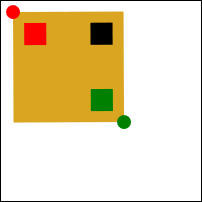
This is the same as box 2 - except that the corner opposite the upper left (e.g., the 10,10 corner) should appear at the green dot. That is, the corner of the square closest to the green square should be close to the green dot. You may choose how you make the transformation - but make sure it keeps the square a square. The function to edit is twoDots in
02-21-03.js
(02-21-03.html).
view - look at the box and experiment with it
examine - look at the code for the box
edit - change the box's content
rubric - several steps are suggested in the rubric page - form elements on page in rubric
02-21-03.html 02-21-03.js
| Kind
Kind of rubric items: standard - expected from all students advanced - used to get a better grade creative - an opportunity to do something creative levels - rubric item graded by selected achievement level optional - not required, but encouraged |
Description | |
| standard | red dot stays in red corner and green dot stays in green corner as dots are dragged; square remains square |
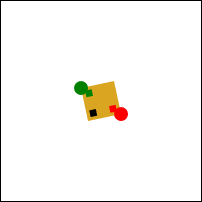
Here are some snapshots of what this should look like when it is working:
Box 4: Exercise 4, Convert to Transform
In the code for this box (02-21-04.html and 02-21-04.js ), each of the squares in the top Canvas is placed by a sequence of rotate, translate, and scale commands.
Your job is to figure out what the transformation is for each of the squares, and write it as a matrix (the 6 numbers that setTransform takes). You should edit the file for_students/ex-convert-transform.js and fill in the appropriate values in the array matrices.
view - look at the box and experiment with it
examine - look at the code for the box
edit - change the box's content
rubric - several steps are suggested in the rubric page - form elements on page in rubric
02-21-04.html 02-21-04.js
| Kind
Kind of rubric items: standard - expected from all students advanced - used to get a better grade creative - an opportunity to do something creative levels - rubric item graded by selected achievement level optional - not required, but encouraged |
Description | |
| standard | parameters changed so that square 1 matches | |
| standard | parameters changed so that square 2 matches (freebie!) | |
| standard | parameters changed so that square 3 matches | |
| standard | parameters changed so that square 4 matches | |
| standard | parameters changed so that square 5 matches |
Box 5: Exercise 5, Shear
Shear (sometimes called skew) is a fundamental linear transformation. It is discussed in the textbook, specifically FCG4 Chapter 6. Unfortunately, Canvas doesn’t have it.
Implement the “shear-x” transformation in the shearX function in
02-21-05.js
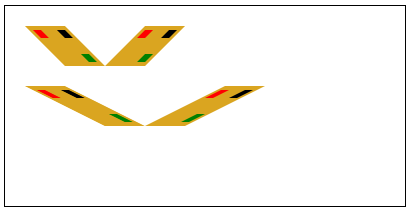
(02-21-05.html). The following Canvas code calls that function to test it. Since the shearX does nothing right now, you see squares here. If you implement things correctly, you should see sheared boxes. The test code does save and restore - you should make shearX work like context.rotate, except that it is a function not a method.
view - look at the box and experiment with it
examine - look at the code for the box
edit - change the box's content
rubric - several steps are suggested in the rubric page - form elements on page in rubric
02-21-05.html 02-21-05.js
| Kind
Kind of rubric items: standard - expected from all students advanced - used to get a better grade creative - an opportunity to do something creative levels - rubric item graded by selected achievement level optional - not required, but encouraged |
Description | |
| standard | shear-x implemented to draw sheared squares |
Here is what it should look like when you are done:
Hint: using context.transform is the easiest way to do this.
Summary
That was a bit of math programming. Now on to Next: Page 22 - Robots! (Kinematics and Inverse Kinematics).