Page 4: Some 3D Math
Spring 2026 Sample Solution
Before digging into 3D programming, we should review a few mathematical preliminaries. These are all things that will come up at some point. The key thing here is to define some words and concepts that will pop up over the remainder of the course.
It’s best to see these things explained with physical props, which I do in the video (although I was getting thrown off by watching myself mirrored):
The video continues to talk about triangles (which this page does as well), again with physical props, and shapes in 3D.
Part of 2023 Lecture 13 | Slides
The following is a summary of how we use coordinate systems in 3D.
Coordinate Systems and Handedness
A 3D coordinate system has 3 axes: X, Y, and Z. If we define the axes to be orthogonal to each other, there is a choice as to which way the third axis goes.
In class (and most of computer graphics), we use right-handed coordinate systems.
This is easier to show than describe…
Right-handed means the axes follow the “right-hand rule”: using your right hand, if you point your fingers along the X axis and curl them towards the Y axis, your thumb will point in the direction of the Z axis.
Alternatively, if you point your right pointer finger towards the X axis and your (right) middle finger towards the Y axis, your thumb will point along the Z axis.
Alternatively, you can point your (right) thumb in the X direction, point your fingers in the Y direction, and then your palm faces (or middle finger points) in the (positive) Z direction.
The trick is that this only works for the right hand.
These pictures are the “standard” we will use in class: the X axis is to the right (along the screen), the Y axis is up (along the screen), and the Z axis points towards us (out of the screen).
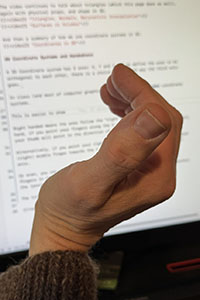
Fingers towards X, curl towards Y, thumb is +Z..
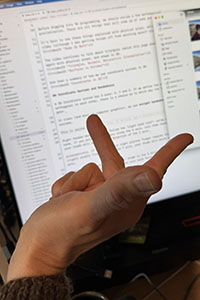
Index towards X, middle towards Y, thumb is +Z
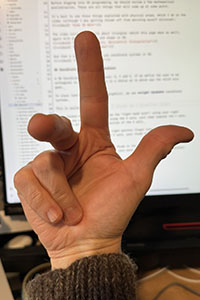
Thumb towards X, pointer towards Y, middle finger is +Z.
Often when doing graphics, we need to think about the relationship between two coordinate systems. Since we only have one right hand, we might be tempted to use our left hand - it’s a mistake that all graphics programmers make at some point. This is part of the reason I find it very helpful to have a physical coordinate system when I do graphics work. It’s also a lot easier than twisting your hand in funny ways.

In class, and in Three, we use right-handed coordinate systems. Some other graphics systems use left-handed conventions.
Cross Product
The cross product defines an operation between two vectors that creates a new vector that is perpendicular to both of its arguments. The direction of this new vector is defined by the coordinate system. Since our coordinate systems are defined to be right-handed, the direction will be right-handed.
The cross product is defined such that .
Coordinate System Conventions
For the screen, the systems we use (and the convention we will prefer in class) are to have X going to the right, Y going up, and Z coming out of the screen. This means as viewers, we are looking in the negative Z direction as we look at the screen.
Other than the screen, coordinate systems are completely up to the user/programmer. I tend to like to have 3D coordinate systems with Y being up, which has the advantage that it matches the screen convention. This makes the floor be the X-Z plane. A different convention is to have Z being up, so X-Y is the floor.
Triangles
Triangles are the fundamental primitive of computer graphics. In many systems, almost everything ends up being triangles. Three is such a system. Most graphics hardware is based around drawing triangles. In fact, for some systems, lines are just degenerate triangles.
If a triangle has collinear points, then the triangle collapses and has no area. For the rest of this section, we won’t consider degenerate triangles.
The three points of a non-degenerate triangle lie in a plane. We can talk about the direction perpendicular to this plane as its normal (or the triangle’s normal). We follow the right-hand rule: the order of the points matters.
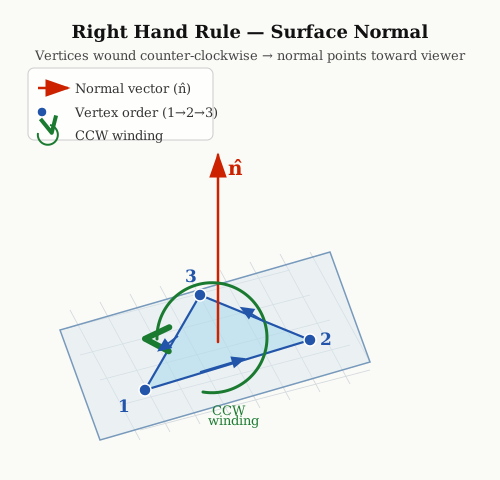
The idea of the directed normal of a triangle will be very important. The general convention is that the normal should face “outward” from the object. This will be important since sometimes we use this direction to determine the appearance of the triangle - the outside should appear different than the inside; or sometimes the inside shouldn’t appear at all.
Barycentric Coordinates
Barycentric coordinates use a triangle to define a coordinate system within the triangle (and for the entire plane the triangle is in).
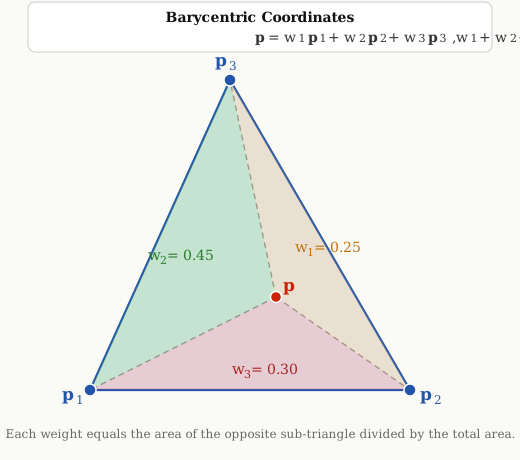
We define a point as a linear combination of the triangle’s points. Here, I’ll call the points p, and the weights w.
So, each point is scaled by its own weight. Barycentric coordinates add the constraint that the weights all sum to 1: .
If all of the w are positive, the point is inside the triangle. Because of the sum-to-one constraint, they are also all between . If one of the w is zero, the point is on the edge of the triangle opposite that vertex.
Barycentric coordinates provide a way of specifying positions inside a triangle. They can also be used to test if a point is inside of a triangle.
Barycentric coordinates are equal to the area of the triangle created by the point, as shown in this diagram:
Shapes in 3D
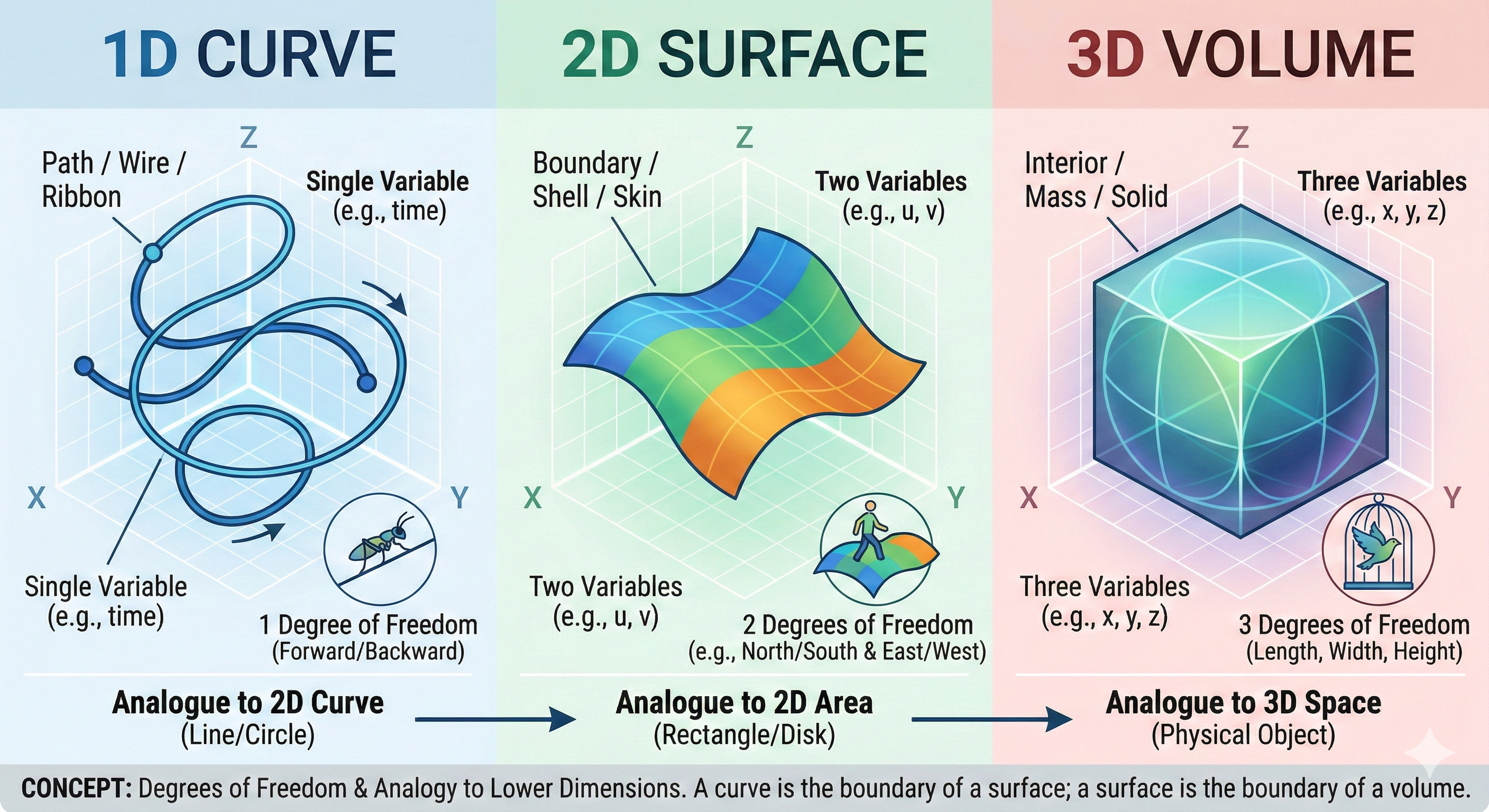
In 2D, we could have points, curves, and areas (regions inside of things). The sets of points are different, but all of the different kinds of shapes are sets of 2D points.
In 3D, we can have the same things, except that now all of the points have positions in 3D space. We can have a line or curve in 3D (think of a path through space, rather than in a 2D plane). The area or region of 2D is a surface in 3D: it is infinitely thin (it has area, but not volume). In 3D, we can have volumes - shapes that enclose an interior space.
You can think of a block as a 3D volume. The boundary of the block (between its inside and outside) is a surface. The top of the block (a rectangle) is a surface. The block has edges which are curves (the boundary between the faces).
Here is Gemini’s attempt to explain the concept of 3D shape in a picture:
In computer graphics, we typically define shapes as surfaces: we care about what they look like (their boundaries), rather than what is inside. For almost everything in class, we will consider curves and surfaces in 3D. We will rarely talk about volumes. It is kind of like a movie set: we see the outside - we won’t look inside to see that it is just a facade.
If you are designing or manufacturing real objects, or analyzing some object in the world, the existence of the insides is important, so modeling the actual volumes becomes essential. The field of solid modeling (a big part of shape modeling) is concerned with this.
Summary
The math from this page you need to know:
- Right-handed coordinate systems and the right-hand rule
- Cross products
- Coordinate systems with Y up and Z forward
- Triangles with Normals
- Barycentric coordinates for triangles
- Volumes vs. Surfaces