Page 19: Space-Age Sculpture Museum
Spring 2026 Sample Solution
Exercise 5: Curate your own Museum!
In this part of the assignment, we give you some starter code for a “museum.” It has pedestals to display things, spotlights to shine on them, and cameras to look at each thing in more detail. The only problem is that this museum doesn’t have much on display. We call it “space-age” because the objects magically float above their pedestals.
Your job is to add some new objects for museum visitors to see. We’ve given you one simple object to start with. You must add three more objects to fill the other three pedestals.
You may build these objects up from primitives as you did with the snowman, or you may import any of the sample objects in the for_students/objects/ folder included in the project. Please do not import objects you find online. We need to limit the number of items to download for grading. We prefer that you make objects from three built-ins.
As with the snowman, you can use simple materials of different colors (e.g., MeshPhongMaterial or MeshStandardMaterial). Again, the point is not to have the fanciest material; just try different settings out and see what you come up with.
Now, it would be boring if the objects simply sat on the pedestals. You will add a cool sci-fi effect and set each object to float just above its pedestal, spinning slowly in place. If you want the effect to be more convincing, you could (optionally) embellish the motion by making the objects bob slightly, as if they were suspended in some kind of energy field.
In addition, you will need to adjust the position and rotation of the provided spotlights and cameras such that each spotlight shines on one object, and cameras 1, 2, 3, and 4 each point at one object. The “main” camera should remain in the same position and orientation.
Recap of requirements:
- Add three objects (built from primitives or imported from
for_students/objects/folder). - Give each object a material.
- Make each object float and slowly move above its pedestal.
- Move each spotlight to shine down on one of the objects/pedestals.
- Move each camera (other than “main”) to point at one of the objects.
A basic example (from the main camera view) is shown below:
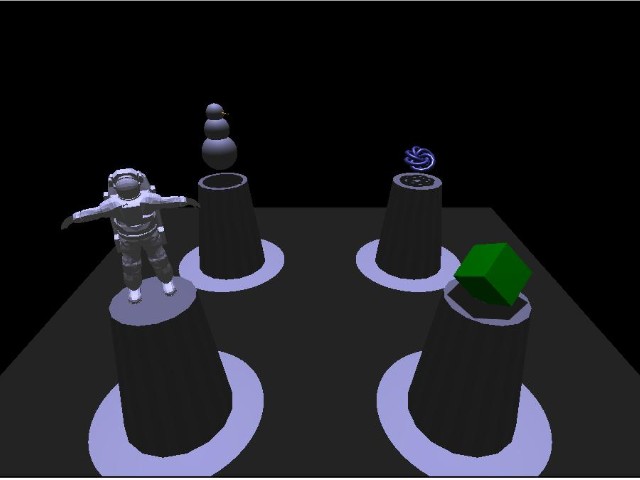
We’ve given you a start in 04-19-01.js (04-19-01.html) where you should put your code. Some details of the starter code are given below.
The program sets up the basic scene by drawing the ground and the pedestals and setting up a window for drawing. It also provides a basic animation loop.
The code makes a first object (a cube) so you can see how to make an object. You can keep the cube, or replace it with something more interesting. You need to make three other objects (not cubes) and make them move (small, slow movements).
There is an “animate” function where you should add the code that makes your objects float and rotate above their pedestals.
Note: We turn on shadows in the starter code. You can safely ignore this - you do not need to make shadows work on your objects and lights. You can copy what we did for the example objects (it’s not hard), but we will not give you extra credit for doing it. We will explain how shadows work (and why turning them on requires several steps) later in the semester.
view - look at the box and experiment with it
examine - look at the code for the box
edit - change the box's content
rubric - several steps are suggested in the rubric page - form elements on page in rubric
04-19-01.html 04-19-01.js
| Kind
Kind of rubric items: standard - expected from all students advanced - used to get a better grade creative - an opportunity to do something creative levels - rubric item graded by selected achievement level optional - not required, but encouraged |
Description | |
| standard | Museum cameras work | |
| standard | Museum objects | |
| standard | Museum objects correctly placed | |
| standard | Museum objects move correctly, not all the same | |
| standard | Museum objects each have spotlights | |
| standard | Each new object has its own material | |
| advanced | At least one object has articulated motion | |
| advanced | Complex museum objects | |
| creative | Complex museum object motions |