Page 12: Viewing: from world to screen
Spring 2026 Sample Solution
Viewing is the process of transforming a point from a position in the world to a position on the screen.
This can be thought of as the process of going from 3D to 2D, but that is a slight over-simplification. We still need the 3rd dimension (Z) to know what objects are in front so we can handle occlusion correctly. We’ll discuss that more, but generally the simplification is OK because the X and Y positions are the most important things, and depth follows along.
We can think of viewing in terms of a camera. The camera has its own coordinate system, centered at its “focal” (or eye) point. The position and aiming of the camera in the world give us the transformation between the world/scene and the camera. The projection transformation then converts from the camera coordinates to screen coordinates.
We can think of taking a picture with a real camera in two steps: positioning and aiming the camera in the world, and then determining how the camera takes in the world and maps it to the 2D image. Positioning and aiming the camera is similar to manipulating any other rigid object in the world; we need to control its position and orientation. The way that the image is formed in the camera has some controls: we control how “wide” the lens is (the focal length - a concept we’ll explain in a moment if you don’t know it). Most other controls on a camera change how it responds to the amount of light. With real cameras, there are complex interactions between the viewing geometry and the quality/amount of light that comes through. We won’t consider that now.
The basic concepts of viewing (cameras and projection) are covered well in the 2023 lectures. The video uses physical props (a real camera) and a 3D demo to show what is happening.
Part of 2023 Lecture 14 | Slides
Part of 2023 Lecture 14 | Slides
Part of 2023 Lecture 14 | Slides
We’ll discuss projection first, and then talk about the camera transformation.
The Coordinate Systems We Care About
A key to graphics in general is to work in a correct and convenient coordinate system. This is even more important when we talk about 3D, where there are even more coordinate systems to consider.
The first coordinate system to discuss is the screen. The screen has a clear definition: it represents the rectangular “window” where the graphics will appear. In some graphics systems, this is the only coordinate system that is “built in.” Unlike with 2D APIs (where we often measure from the top left corner and have the Y axis facing downward), we will usually use the convention that the X axis goes to the right, the Y axis points upwards, and the origin (for X,Y) is at the center of the window.
The screen coordinate system does have a Z-direction: given our conventions (Y up, right handed), the Z axis points out of the screen towards us. That means we are sighting down the negative Z axis (for normal viewing). You can think of the screen/window as a rectangular box (like a fishtank) that you are viewing from the front. We need the Z positions so we know what objects are in front of other objects (so that closer objects can occlude farther ones). Just as the screen has edges on the side (the top, bottom, left and right boundaries), it also has edges in the front and back. Objects that are too far behind, or too close to the view in front, are outside the box.
We often refer to the screen-aligned box with normalized device coordinates (NDC). NDCs normalize the range along each axis, so that the center is 0,0,0 and the range along each axis is from -1 to 1. So X=1 is the right edge and Z=1 is the near edge (remember, the Z axis goes towards the viewer in a right-handed coordinate system).
The other coordinate systems depend on the process of how we define the 3D world that we are drawing pictures of. I want to introduce these first, but they will make sense as we add the details of viewing.
- Clip coordinates are a mathematical definition related to how we will use homogeneous coordinates. They are the boundaries of what is visible, but in homogeneous space (before the divide by w of homogeneous transformations).
- View or Camera coordinates are a coordinate system that is centered at the viewpoint, and oriented so that the (negative Z) direction is the direction we are looking in.
- World or Global coordinates are a coordinate system that describes where things are in an overall conceptual space. Often, this doesn’t matter. If I am taking a picture in my office, it doesn’t matter what the GPS coordinates of the building are. I can define everything in terms of the room that I am in, since it is the relative position of the objects to the camera that matters.
- Scene is a coordinate system that we define that is convenient for describing things that we care about (not the whole world). For example, if I am making pictures in my office, I might define the coordinate system to be convenient for my office. It doesn’t matter where the room is in the world.
- Object coordinates are coordinate systems that are convenient for specific objects.
I want to emphasize that it is the position of objects relative to the camera that ultimately matters. It doesn’t matter where the camera and object are: if the object is in front of the camera, you see it. World and object coordinates are mainly there for our convenience. It isn’t convenient to describe everything relative to the camera (especially if the camera moves around). Therefore we “invent” scene (or world) coordinates in which we can conveniently describe geometry and place the camera.
Projection
A projection reduces the 3D scene to 2D (preserving some amount of depth information for occlusion). For now, we’ll ignore the depth aspect in the result (so it is 3D to 2D). It is a transformation from the space in front of the camera (camera coordinates) to the coordinates of the camera’s image plane (which are effectively screen coordinates or NDC).
There are three main types of projections that are useful in viewing:
- Orthographic - An orthographic projection basically flattens along an axis. Because our convention is that the camera sights down the (negative) Z axis, the default is to compress things along that axis. However, since we can rotate the camera, an orthographic projection can be along any axis. An orthographic projection preserves size. Objects that are far away appear the same size as objects that are close.
- Perspective - A perspective projection means that objects that are farther away (in terms of depth) appear smaller. Perspective projection is the way we naturally see the world. It is the kind of picture a regular camera takes.
- Isometric - An isometric projection is similar to an orthographic projection. However, it preserves distances in all dimensions.
Here are some pictures to give you a sense of what the projections look like:
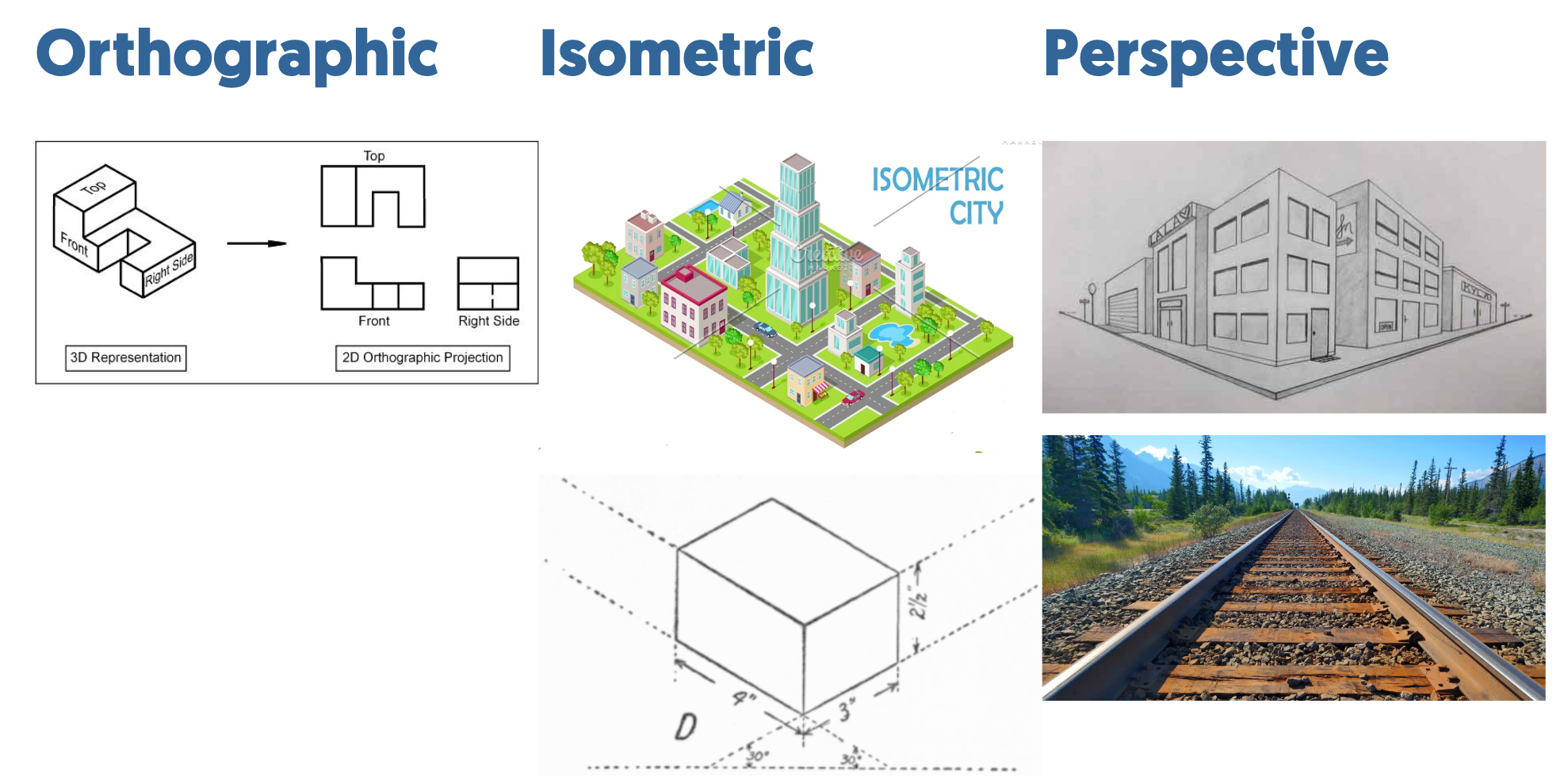
Orthographic and Isometric projections are often used in mechanical design because they preserve distances - measurements can be taken from the images. Isometric views are sometimes used in computer games because they look cool. Sometimes we use orthographic projections in computer graphics because we don’t want to think in 2D, without being concerned with things getting smaller as they get farther away.
But, most of the time, in 3D graphics we use perspective projections.
Isometric Projections
Isometric projections are useful in providing a “top-down-like” view of a relatively flat world. This kind of design is common in games (or at least was common in games). Things can have height that sticks out of the world, but it’s really a 2D-like map with some embellishment.
In an isometric projection, each axis in the world is mapped to some direction on the screen. The common thing (for Y-up) is to map Y to Y, and X and Z to 120 degree directions as in the picture. Importantly, the length mappings must be preserved.
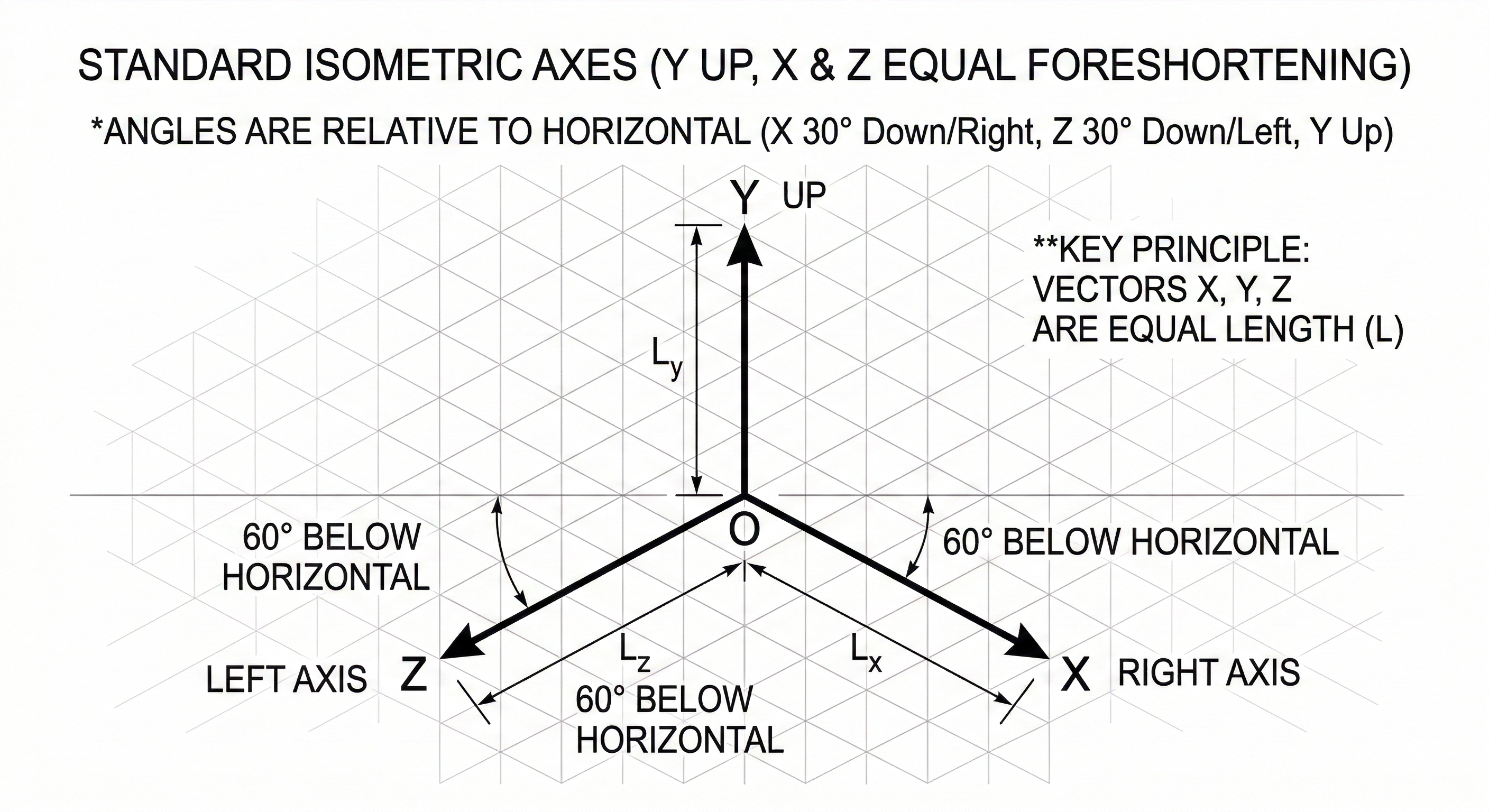
This image was generated by Gemini.
Three does not have isometric projections built in (to my knowledge). However, it is easy to apply a matrix transformation to the objects (since the isometric projection is a simple affine transformation) and use an orthographic projection.
Projection Details
Projections are in terms of the camera coordinates. Therefore, we need to define things in those terms.
The camera position is the origin of its coordinate system. We call this the focal point or view point. We define the direction the camera is pointing as the viewing direction. This is typically the negative Z axis (although, for simplifying the math we might pick other things).
We will also define the image plane - the surface that we are forming the image on (or projecting the image to). This is an actual plane in the world (just as the camera’s sensor is in an actual place in the world when you take a picture). The image area is a rectangular portion of the image plane. We assume that the image plane is orthogonal to the viewing direction and that the image area is centered around the viewing direction axis.
Here is a picture to help us define the terms for the two key types of projections:
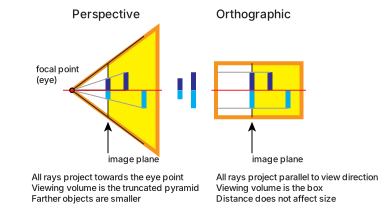
Notice that with both types of projections, there is an area (shaded in yellow) that is the region of space that the camera “sees” - things in this space will be mapped to the (visible area of the) image plane. For perspective projection, the overall space in front of the eye is a pyramid (a triangle in 2D), and if we cut off things that are too close (closer than the image plane, assuming that the “near” edge is the image plane), we get a pyramid with its top cut off. The name of this shape is a frustum. The area for objects in an orthographic projection is a box.
Perspective Projection
The Graphics in 5 Minutes videos provide an excellent introduction to perspective projections. His explanations include many more real-world aspects that are relevant to photography and vision.
These videos should be considered as required - even if you know the stuff, his visual examples are quite useful. We won’t worry about depth of field for now: in computer graphics, we often have a “pinhole” model where the aperture is infinitely small, so everything is in focus. (You’ll understand that after watching the video.)
To define the math of perspective projection, we will use this diagram. Notice that the X axis is the viewing direction. Our “image plane” is a vertical line. The image is positioned as the focal length along the viewing direction. We use the variable d to denote focal length (f usually means far).
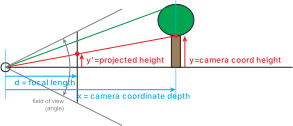
In the diagram, there is a tree at distance x along the X axis. The height of the trunk of the tree is y. We need to project the point (x,y) to the image plane (so it will be (d,y’)). Similar triangles (high school geometry) tell us
which we can re-write as . Basically, we divide by the distance.
Now, you might wonder… how are we going to make this division by distance into a linear operation? This is where homogeneous coordinates come in handy. If you remember, to convert back from homogeneous coordinates to “regular coordinates” we divide by w. So, if we make w=x (the thing we want to divide by), we get what we want.
So, our projective transformation will be:
That’s a simple linear equation that we can write with a matrix:
Convince yourself that this works. It’s simplified (in 2D), but it will extend naturally to 3D - it’s much easier to understand in this form.
A few things to notice before we move on…
- As the object gets farther, its projection on the image gets smaller. This is the expected perspective effect.
- The field of view (the angle that the camera can see) can be determined from the focal length and the “height” of the image area. Photographers like to talk about focal length, but interpreting that requires knowing the image size.
- If an object is at 0 distance, we get a divide by zero.
- All depths get projected exactly to the image plane. We lose all information about depth, so we cannot make closer objects occlude farther ones.
The Real Perspective Matrix
The 2D example gives you the intuition behind the “real” perspective matrix (a 4x4 homogeneous transformation that maps 3D space into the 3D space of the screen).
Extending to 3D is easy: x and y are treated similarly, and w is determined by depth in the viewing direction (which is negative z for us).
The tricky part is preserving the depth information. We cannot just make z’=z, since that will turn into a constant when we divide by w. So instead, we set z’ to be a constant, which is divided by the depth. The resulting value is the reciprocal of the depth, not the depth. However, this does preserve the same ordering (modulo a sign flip), so it works for our purposes. So, a simple 3D perspective matrix is:
Again, notice how the x and y get divided by (negative) z, but now the resulting z’ is -1/z.
The “full” perspective matrix that you would see in a graphics textbook (or inside the three js code) performs scaling operations so that the resulting z’ scales the world distances near to far to -1 to 1 (since we want normalized coordinates). Similarly, it scales things in the x and y directions to be in the normalized range as well.
This matrix is built into three. You should understand the intuitions. If you want to see how the scaling works, look at a graphics textbook. You can see the matrix in the three code if you like (search for “makePerspective”). It looks remarkably like the matrix I have here, except that it uses a few more variables.
The Camera
The “normal” camera we will use to make scenes is the PerspectiveCamera - see its documentation.
The three.js perspective camera takes the field of view (not the focal length as a parameter). It also requires knowing the aspect ratio of the window you will be drawing to. This is important, since internally it works in normalized coordinates, so it needs to know how to stretch things so they don’t look squished if the window isn’t square. It also needs to know the near and far distances. You should set this to be the range of depths you expect objects to have.
Note that the camera, by default, sights down the negative Z axis from the origin. We’ll work with that on the next page.
Summary
Projection is the key piece of getting from 3D to our 2D screen. You should understand the concepts of the key projection types (perspective, orthographic and isometric), and have the intuitions for how perspective transformations work and can be encoded as homogeneous transformations (4x4 matrices). Even though this matrix is built into (most) APIs, understanding it will help you appreciate the quirks of using it.
Next: Page 13 - Camera Transformations