Page 20: Transformations in 3D
Spring 2026 Sample Solution
Transformations in 3D are just like transformations in 2D; we just add another dimension.
We discussed how transformations work in three.js back on Page 10 (Transformation in Three.js). Here we will discuss some of the more general 3D concepts.
Affine transformations are extremely important in 3D. We usually implement them as linear transformations in homogeneous coordinates, which means 4x4 matrices. This works just like it does in 2D: we add the extra w dimension, and give our points a w value of 1. To convert back from the 4D world of homogeneous coordinates to the 3D of our universe, we need to divide by w.
All of the affine transformations we learned about in 2D have their counterparts in 3D. We can translate, scale, rotate and shear. We can do arbitrary combinations of all of these things. There are a few things that we do need to consider in 3D:
-
We also use homogeneous transformations for viewing: both the camera transformation and the projection. These are just more transformations - they can be composed together with the “normal” transformations we use for moving objects around. We often consider the “whole transformation” from object coordinates all the way to screen coordinates.
-
In 3D, we have points and normal vectors (perpendicular to the surface). When we transform the points, we need to consider how to transform the normal vectors so that they stay normal to the surface.
-
In 2D, rotations were simple: we rotated around a point. Technically, in 2D, all rotations are around the Z axis. We could specify rotations by the amount of rotation (an angle). In 3D, rotations are much more complicated because we can rotate around any axis - not just one of the coordinate axes. This flexibility means that it is more complicated to specify rotations. We will discuss this, and see some of the options for specifying rotations.
We’ll explore these topics over the next few pages.
Transforming normals
When we transform an object, we move the points to different places. However, we also need to update the normals so that they are still “normal” to the surfaces defined by the points.
In general, the normal vectors are not transformed the same way the points are. Here’s a simple example. If we have a circle, the normals should point outward. If we stretch the circle in the X direction, we can’t just stretch the normals in the X direction. If anything, the top of the circle is flatter, and the normals should be more vertical.
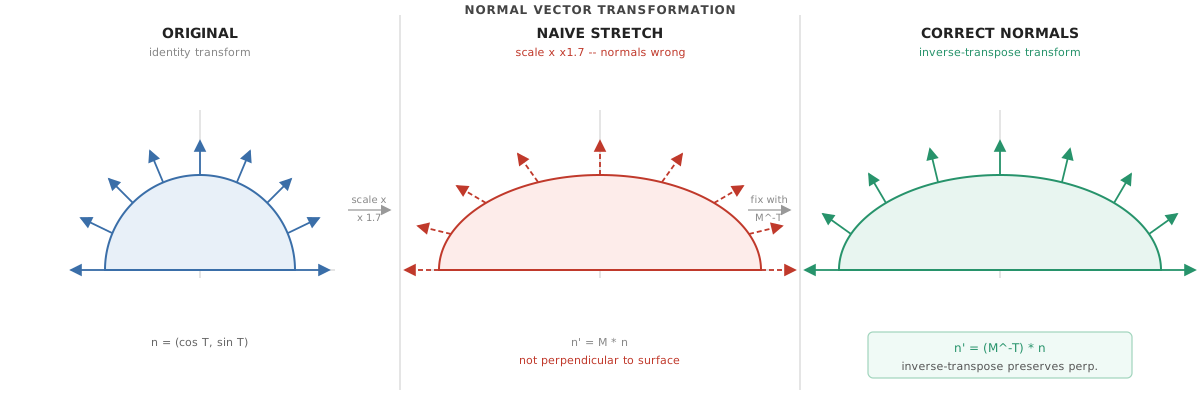
The normals to a circle need to be outward (perpendicular to it). We apply a scaling transform to stretch the circle. If we do the same transformation to the normals, they get stretched to the side. Instead, they need to be transformed differently. Generated by Claude - so it might not be precisely to scale.
The trick is that when we transform points by the matrix M, we need to transform the normals by the inverse of the matrix transposed, or .
This means that if we want to use a matrix, we also need to compute its inverse transpose. As it turns out, the computation is simple for many matrices. This is part of the reason why many APIs (like three) build the matrices from simple transformations as it allows them to construct the inverse transpose matrix the same way.
For the special case of rotations, the transpose is the inverse. Therefore the transpose of the inverse is the matrix itself.
Affine Transformations in 3D
If you want to review affine transformations, I recommend the graphics in 5 minutes video:
The matrices are very similar to what we saw in 2D. They just have an extra row and column for the extra dimension. Transformations can happen along any axis. For rotations, that can make things much more complicated.
Next: Page 21 - Rotations in 3D