Page 18: Snowman
Spring 2026 Sample Solution
OK. The time has come for one of the big things in class: making a snowman. It’s been the mascot of CS559 for years.
You have made a 2D snowman as an exercise, but now we’ll make it in 3D as a way to practice programming in three and trying out the concepts.
Note: the goal here is to show that you can make objects by using transformations to assemble collections of “primitive” (built-in) objects and applying standard materials. We want you to make a “standard” snowman this way. Use this as a chance to practice the basic skills.
We know that AI can add all kinds of advanced features to make a fancy snowman. We know that you can find a complicated model of a fancy snowman. Make a basic snowman yourself first.
That said, after making a basic snowman, you can make some extra, possibly fancier, snowmen too. Remember the ground rules: you should only use the graphics techniques we’ve learned about so far. No textures or shaders or other stuff we haven’t talked about yet.
We’ve seen some very creative snowmen over the years. The snowdog was a personal favorite. Notice that there is a (well-done) standard snowman as well. Because this was a different class, the students used shadows and backgrounds. We haven’t learned about those yet this year.
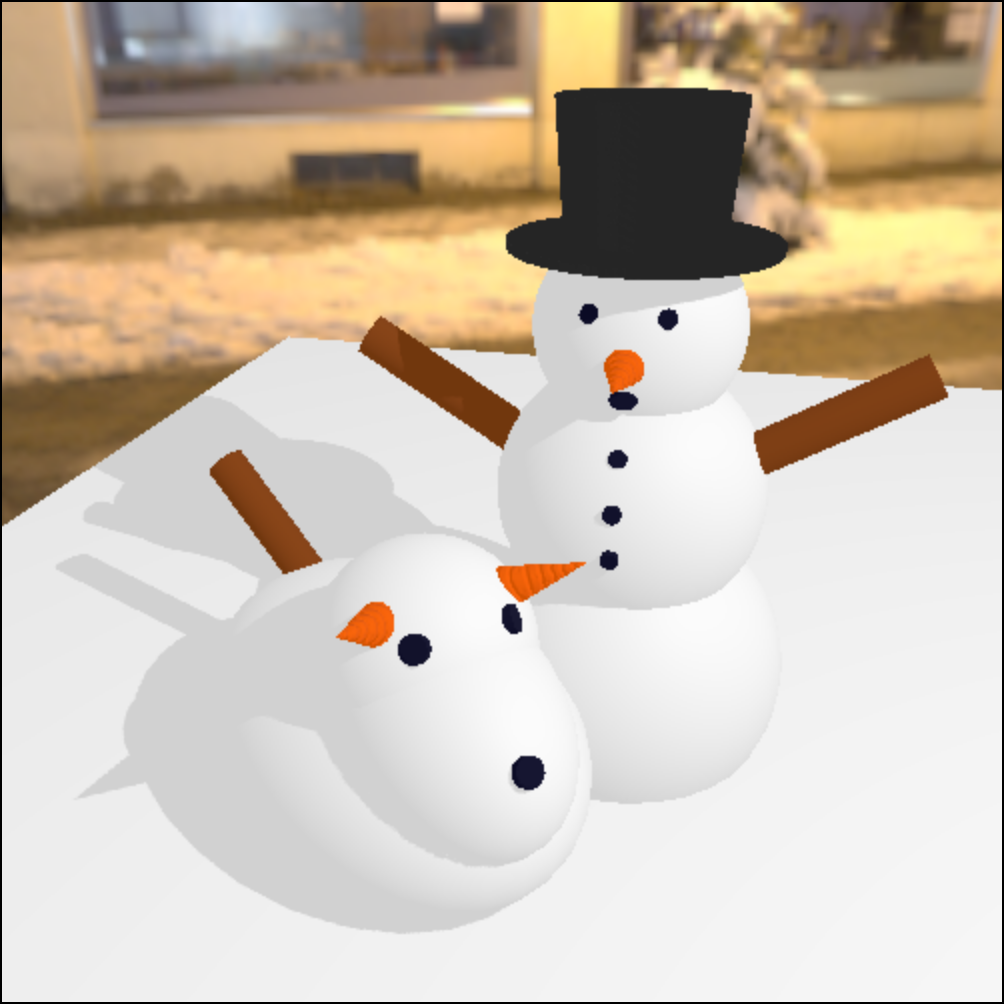
A classic snowman and a snow dog. From a CS559 Spring 25 honors class student.
Exercise: Make a snowman using THREE!
You should make the snowman using THREE primitives. You can use spheres for the snowballs (the main parts of the body), a cone to make a carrot nose, a cylinder and a ring to make a top hat, etc.
You’ll need to make primitives (Spheres, Cones, …) and use their transformations (position, scale, rotation) to assemble the snowman.
You can use simple materials of different colors (e.g., MeshPhongMaterial or MeshStandardMaterial). A white standard material won’t look like snow, but it will be good enough for this assignment. Our goal is that you know how to apply materials to get different colors, not necessarily to make materials to get special effects (like snow).
The main point of the assignment is to create a specific shape using THREE primitives.
At a minimum, your snowman must have a body, a head, eyes, and a nose. We were thinking of the “classic three-ball snowman” (see the Wikipedia Page, for example), which gives enough parts (3 sections of the body, eyes, a nose, a mouth). You can add the hat and corncob pipe too. If you want to be more creative, make a regular snowman first, and then put another one next to it.
You do not need to animate your snowman. It’s an advanced feature.
Please put in a piece of ground (it can be a flat box) that the snowman stands on.
We’ve given you a start in 04-18-01.js (04-18-01.html) where you should put your drawing code.
Here is a place to put the snowman. We have already loaded THREE and OrbitControls. Please add OrbitControls to your picture. Note: we haven’t given you much in this file. It’s up to you to make the lights, camera, objects, etc. We just took care of the renderer.
view - look at the box and experiment with it
examine - look at the code for the box
edit - change the box's content
rubric - several steps are suggested in the rubric page - form elements on page in rubric
04-18-01.html 04-18-01.js
| Kind
Kind of rubric items: standard - expected from all students advanced - used to get a better grade creative - an opportunity to do something creative levels - rubric item graded by selected achievement level optional - not required, but encouraged |
Description | |
| standard | Visible Objects (requires lights, camera, at least some shapes) | |
| standard | Different materials used (everything isn't the same color) | |
| standard | There is a ground, Snowman on ground | |
| standard | Snowman Body as 3 stacked spheres | |
| advanced | Nice Snowman (eyes, nose, mouth) | |
| optional | Animated snowman | |
| creative | Second, creative snowman |